- Anubhav Sarker
- Published: 02/03/2026
- Last Updated: 09/22/2026
If you already manage a CRM, or you are two weeks into setting one up, the question is not which CRM to buy. It is what to do differently so customer information stays worth reading, follow-ups happen, and a colleague can pick up where you left off.
Four businesses appear below. All are published Bigin customers, and Bigin is our product, so read their numbers as customer-reported rather than as proof.
1. Start with one problem, and say what fixed looks like
Pick the single thing that costs you most: slow first replies, quotes that go quiet, renewals that arrive as a surprise. Then write one sentence describing the fixed state, with a number and a date. By March 31, every inquiry gets a reply the same business day.
When Jan Tukker joined GMS Systems, a Cape Town materials-handling supplier, as COO, he found it losing work because nobody got back to customers quickly enough, and there was no visibility into who was handling what. Narrow enough to configure against.
The usual failure is not the absence of a goal. It has six.
2. Shape records, fields, and stages around the work you actually do
Write on one page what happens when someone is interested, and we have been paid. Build only what that page requires.
One pipeline is rarely enough once work continues after the sale. GMS Systems runs separate pipelines for sales, projects, R&D, and marketing because a project that has already been won requires different stages than a deal that has not. The structure copies the work rather than the software's default.
Stages should describe a change in the customer's situation, not an internal mood. The proposal sent is at a stage. Hot is not, because two people will disagree about what it means, and neither will be wrong.
Resist custom fields early. Every one you add is a field someone has to fill, ignore, or lie in. Add one only when you have wanted to filter on it twice.
3. Write down your data entry standards, and decide what counts as a duplicate
Standards work when they are short enough to remember. Four rules usually cover the whole thing: company names as they appear on the invoice, phone numbers with area codes, no shorthand in the name field, and every record gets an owner.
Then split your fields into two lists. Required now: company name, one contact with an email or phone, source, and owner. Everything else waits. Forcing all of it at creation teaches people to type TBD into eight boxes.
The better place for a gate is the stage change. Galaxy Freight, a Mumbai freight forwarder, uses stage transition rules: a deal cannot move forward until the shipment details and verification documents are attached. Nobody is blocked mid-call, and nothing incomplete reaches operations.
Duplicates need a rule too, because the obvious one is wrong. Two records with the same company name but different people are usually two contacts at the same company, and merging them destroys the history of both. A duplicate is the same person, usually the same email address, entered twice. Read the notes on both before merging, because whoever created the second was talking to someone. Automatic deduplication is not standard across CRMs and is often a paid feature.
4. Give every active customer one owner and one dated next action
This one does the most work and gets skipped because it feels like bookkeeping.
One owner per active record. Not a team, not sales. A person, by name, is accountable for the next move. And one next action with a date, booked before the call ends. A record with no dated next action is a customer you are about to forget.
Byron Barillas of WorkCon, on the years his company ran on paper and spreadsheets: "The problem was that you didn't know where a lead stood. If someone was absent, you didn't know what to do with that lead, and that was such a big problem."
The note matters as much as the date. A useful one takes about 20 seconds and has four parts: what the customer said, what you agreed, what happens next, and by when. The shape, with a cleaning contract standing in for whatever you sell:
"Apr 9 call, office manager. Restrooms were missed twice on the Thursday clean, the second time this month. Agreed, we re-clean Friday at no charge, and the crew lead confirms Thursday coverage going forward. Next: confirm with crew lead by Apr 11, call her back Apr 12."
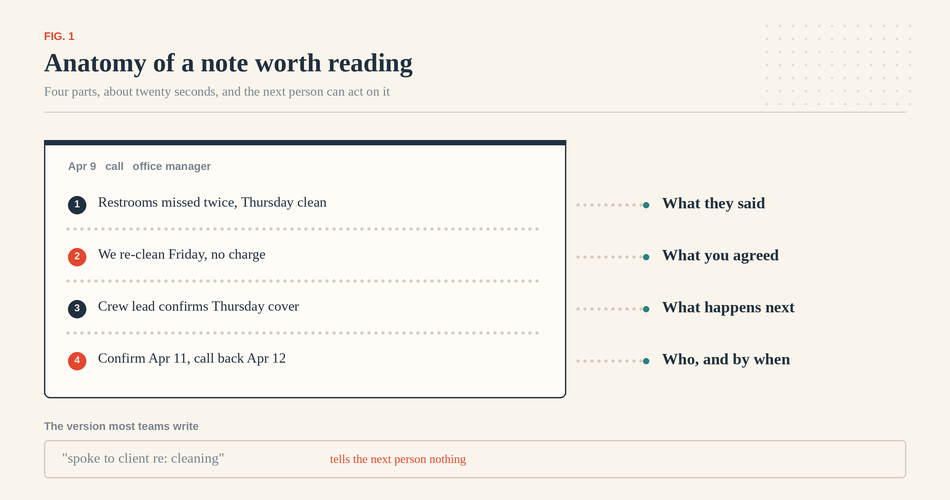
Fig. 1. A note anyone can act on records four things. The version most teams write records none of them.
Compare that to "spoke to client re: cleaning," which is what most notes look like and tells nobody anything.
Some CRMs now offer AI that drafts a summary from a call recording or an email thread. It handles the first two parts well and the last two badly, because commitments are often settled in tone rather than words. Read it, fix those, then save.
Decide in advance what happens when an owner is away or an action goes overdue. A workable rule: any task three business days overdue is reassigned at the Monday review, and anyone out for more than two days hands over their open records by name.
The agency that learned this the expensive way
DAB Insurance is a one-person agency in Italy, founded in March 2022 by Vito D'Abramo, who advises families and businesses on insurance and financial planning. It ran on spreadsheets, handwritten notes, WhatsApp, and email. The published case study identifies the breaking point: a significant policy loss due to a missed renewal.
It now keeps new clients, renewals, and business accounts in separate pipelines, with custom fields for policy type and expiration date, and reminders on both. DAB reports its ability to handle more deals in an organized way improved by 15% to 20%, and that assigned tasks and reminders cut downtime by at least 30%. Its own figures, several things changed at once, one business rather than a benchmark.
5. Train people on their own work, and make managers use the same records
Generic CRM training does not survive contact with a Tuesday. What works is 30 minutes per role, on that person's real accounts, covering the four or five things they do daily and nothing else.
Expect the habit to cost something first. Jan Tukker at GMS Systems: "We use tasking quite a lot. It has been quite a cultural change for our business, but it certainly holds people accountable and helps deliver projects and quotes much faster." Cultural change is the honest description.
What decides adoption comes afterward, and it is not training. If a manager asks where things stand instead of opening the record, everyone learns the record is optional. If the manager opens it, sees no note since the 9th, and asks about that, the behavior fixes itself within a month. Pipeline reviews run from the CRM screen, or they teach people that it does not matter.
Say what the CRM is not for, too. If reps read activity logging as surveillance, they log only the minimum needed to stay out of trouble, and your data will be exactly that honest.
6. Automate the repeatable parts, with exceptions and a stopping condition
Automate work that happens the same way every time and carries no judgment: assigning a new inquiry, creating the first follow-up task, raising a renewal task 60 days before the contract date.
Before you turn a rule on, write down three things. What triggers it? Who it should skip. When it stops.
The stopping condition is the one team forgets, and it is where automation does real damage. A sequence should stop when the customer replies, opts out, or there is an open complaint on the account. The third is the expensive omission: a cheerful how are we doing email two days after an unresolved problem costs more goodwill than the sequence will earn.
Check what your CRM can key on first. Bigin's workflow rules trigger on record creation or edit, or on a date field, and carry up to five criteria; the documentation describes no stop on reply condition, so that has to come from record structure. Other systems differ.
Accounts in dispute, accounts with a payment problem, and anyone who asked to be contacted by phone should be excluded from automated messages entirely.
7. Protect the context when a customer changes hands
Many customer management failures are handoff failures in disguise: sales to delivery, delivery to service, service to renewal. The customer explains everything again and concludes you are not paying attention.
A handoff is finished when the receiver accepts it, not when the sender changes the owner field. Before accepting, they should see four things on the record: what was sold and at what price, anything promised outside the standard terms, who the customer's people are and which one decides, and anything already going wrong.
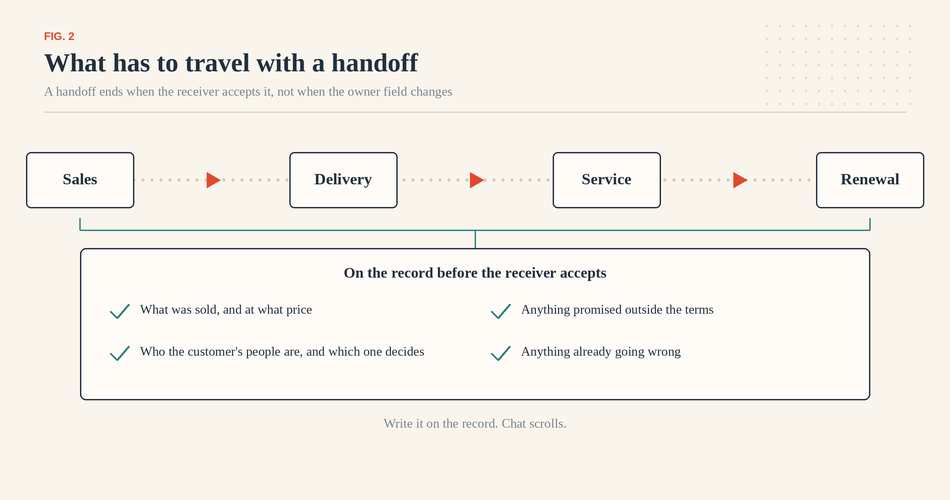
Fig. 2. The four things a colleague needs before they can take the account over.
Where that context lives decides whether it survives. GMS Systems moved project discussion into notes on the deal and project records instead of email threads, and set notifications so engineering, design, and implementation hear when a project moves forward. It reports internal email down about 70% and productivity up about 30%. Their figures, several things changed at once. The mechanism that transfers is this: the conversation sits on the record, so the next person inherits it without anything being forwarded.
8. Connect only the tools you need, then test how data moves
Email and calendar sync earn their place. After that, be skeptical. Each integration is another thing that can write to your customer records, usually while you are not watching.
Test any new connection with real data first. Create one record in each system and watch what appears in the other, looking for a second copy rather than an update. Change the same field in both within a few minutes and see which survives. Then break it on purpose for an hour and see if anything tells you it failed. Silent sync failures are the expensive kind, because you keep trusting the data for weeks.
Write down who gets notified when a sync breaks. If the answer is nobody, the answer is you.
9. Review a few real measures, and give the CRM a named owner
Four operational measures are enough, and each needs a denominator and a period, or it becomes an argument.
Overdue tasks: open tasks past their due date, as a share of all open tasks, are read at the same hour every Monday. Coverage: active records carrying a task with a future due date, as a share of all active records. First response time: median hours from an inquiry arriving to the first outbound reply, over a rolling 30 days, since one holiday weekend ruins an average. Handoffs completed: those the receiver accepted within two business days, as a share of all handoffs that month.
Those four tell you whether the system is being used. They are not business results. Revenue, retention, and average contract value are outcomes, and many factors drive them. A CRM can make follow-up reliable; it cannot make a weak offer sell.
Someone has to own the system itself, usually an office manager or an operations-minded founder, an hour a month, retiring dead fields, merging duplicates, checking rules still match how you work, and removing users who have left.
10. Set access by job, and protect the information you hold
Access is a small decision until your second employee. Set it by job: who sees financial fields, who can export the contact list, who can delete records, and who can change the configuration. Most businesses discover the export question the week someone quits.
Galaxy Freight runs 200 people across several offices and treats this as structural rather than a security afterthought. Mahak Barjatiya, the analyst who led its rollout: "Because we operate from multiple branches, we didn't want everyone to have access to all data. Roles and permissions help us control visibility while keeping everything centralized." The same logic works for six people.
Turn on two-factor authentication for everyone. Remove accounts the day a person leaves. Find out whether your CRM records exports at all, because audit trails are common on higher tiers and absent on entry ones.
One caution. A security feature does not make your business compliant with anything. Privacy obligations depend on where your customers are and what you do with their information; the software is one input.
The first 30 days
If you are fixing an existing CRM rather than starting one, work in this order.
Week one, whoever manages the team: pick the single problem and write the one-sentence success line. An afternoon's work.
Week two, whoever handles operations: agree on the four data-entry rules and the required-now list, then assign an owner to every active record. You will find records nobody wanted.
Week three, everyone, an hour each: a dated next action on every open record.
Week four: add the two automations you are sure about, write down the stopping conditions, and set up the measures.
Check progress at month's end with two numbers: the share of active records carrying a dated next action, and the share of open tasks overdue. Above 90% and below 10% mean the habits are taking hold. If they have barely moved, something in the setup is fighting the work, usually the stages.
A reasonable next step
Take practice four and do it this week. Put one owner and one dated next action on every active customer record, then see what surfaces. The rest gets easier afterward.