- Tamanna Kovoor
- Published: 10/23/2025
- Last Updated: 11/11/2026
The best appointment scheduling software depends on what your customers book
No single tool wins, because a sales call, a haircut, a therapy session, and a house cleaning are four different bookings. Calendly fits meetings. Acuity Scheduling fits paid service appointments. Square Appointments is well-suited to a business that books appointments and takes payments at a single counter. Zoho Bookings fits teams that share staff and rooms. SimplePractice fits therapy practices. Jobber, ZenMaid, and Housecall Pro are well-suited for cleaning and home-service work. Bigin fits a business that wants every booking saved on a customer record.
Your customers will not wait for office hours, either. Square reported in June 2024 that 64% of bookings made through Square Appointments were scheduled outside the typical 9-to-5 day. That figure covers beauty and personal care businesses in the US and Canada from January 2021 to May 2024, and Square sells one of the tools below. I read it as a hint about one trade.
Find what you book in the table, then read that tool’s section
What you book | Tool to look at | The condition that decides it |
|---|---|---|
Meetings and calls | Calendly | The free plan allows one event type and one calendar. |
Paid service appointments | Acuity Scheduling | There is no free plan, and Starter includes one calendar. |
Appointments paid at the counter | Square Appointments | Paid plans are priced per location. |
Bookings across staff and rooms | Zoho Bookings | Payments and resource booking need the Premium plan. |
Therapy and private practice sessions | SimplePractice | Clients send requests, and the clinician accepts each one. |
Self-booked home-service jobs | Jobber | Crew scheduling needs the Plus plan. |
Maid service visits | ZenMaid | The owner converts each booking form into an appointment. |
Dispatched trade jobs | Housecall Pro | The Basic plan includes one user. |
Appointments tied to a CRM record | Bigin with Booking Pages | Its documentation covers no payments, routing, or patient privacy. |
Prices and plan details checked November 11, 2026. All prices are in US dollars.
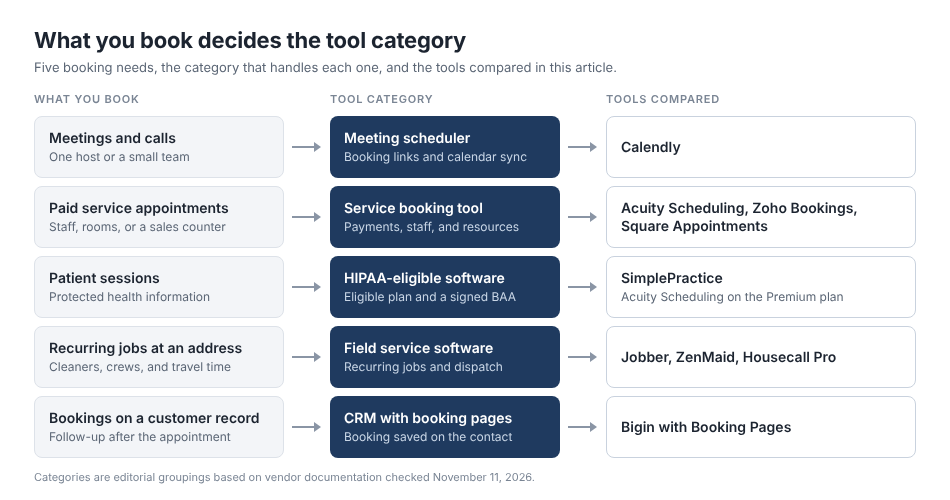
Figure 1. Each booking need points to a different category of scheduling tool.
What is appointment scheduling software?
Appointment scheduling software shows your open times and records who booked each one. Three different things get sold under that name.
A calendar holds your own commitments. A customer booking page lets someone outside the business pick a time without calling. Operational scheduling decides which staff member, room, or crew does the work.
These are separate capabilities. Customer self-booking, staff assignment, resource availability, and job dispatch each require their own features, and a tool that excels at one may fall short in another. Calendly is built around booking pages, not crew dispatch.
Online appointment scheduling software lets customers book without a phone call
Most tools follow the same flow. The software shows your availability. The customer picks a service and a time. The business confirms the booking or approves a request. Reminders go out. The customer can reschedule or cancel from a link.
Tools differ at the third step. Some confirm the booking on the spot. Others hold a request until you accept it, and a request is not an appointment yet.
Time zone conversion matters when customers book from another state. Calendar sync stops a booking from landing on an existing commitment. Buffers leave room for travel or cleanup. Intake fields collect an address or a reason for the visit. Deposits give a customer a reason to show up.
A good-looking booking page cannot fix wrong availability. If the page offers a slot your team cannot work, a customer will book it. Unclear cancellation rules cause the same trouble a week later. Set your hours, buffers, and cancellation policy first.
These tools suit general small-business scheduling
Calendly is well-suited to businesses that book meetings and calls.
Calendly's Free plan is permanent. It allows one event type and one connected calendar. For automated reminders, more event types, or Stripe and PayPal payments, you need to get the Standard plan. The Standard plan costs $10 per seat per month billed yearly, or $12 billed monthly. For round robin scheduling across a team, you need to get the Teams plan at $16 per seat per month billed yearly. New accounts get a two-week trial of paid features.
Acuity Scheduling fits appointments that customers pay for.
Acuity Scheduling lists no free plan, only a seven-day trial. The Starter plan costs $16 per month billed annually, or $20 billed monthly, and it includes one calendar. Every plan accepts payments and deposits through Stripe, Square, PayPal, or Venmo. For text reminders, packages, or gift certificates, you need to get the Standard plan at $27 per month billed annually. The Standard plan allows up to six calendars. Acuity charges by plan and calendar count, not by user, so one calendar is a hard limit for a business with two service providers.
Square Appointments is for businesses that book and take payments in one place.
Square Free costs $0 per month per location. It includes an online booking site, appointment reminders, and unlimited staff calendars. Card processing is a separate charge of 2.6% + 15¢ in person and 3.3% + 30¢ online. For Google Calendar sync, a cancellation policy with no-show fees, or a waitlist, you need to get the Square Plus plan at $49 per month per location. For resource management, you need to get the Square Premium plan at $149 per month per location. Both paid plans have a 30-day free trial.
Zoho Bookings fits teams that schedule across staff and resources.
Zoho Bookings is a standalone scheduling product from Zoho, the company behind Bigin. Its Forever Free plan covers one user, one workspace, and one event type. The Basic plan costs $6 per user per month billed annually, or $8 billed monthly, and it adds unlimited event types and round-robin distribution. For online payments, recurring bookings, or resource bookings, you need to get the Premium plan at $9 per user per month billed annually. Resources are purchased separately, and text reminders run through your own SMS gateway account. Paid plans have a 15-day free trial.
The best free plan is the one whose limit you can live with.
Three of these four tools have a permanent free plan. Calendly Free and Zoho Bookings Forever Free each allow one user and one event type, and neither takes payments. Square Free allows unlimited staff calendars and takes payments, and you pay card fees on every sale. Acuity Scheduling offers a trial only. Only Square Free collects payment at booking without a subscription.
Medical appointment scheduling software must comply with privacy rules first
Confirm three things in writing before you compare features. Find the plan that supports HIPAA use. Sign a Business Associate Agreement, or BAA, with the vendor. Learn where patient information goes after someone books. HHS guidance describes the BAA as the contract in which a vendor agrees to safeguard that information.
SimplePractice fits therapy and similar private practices.
SimplePractice states that it is HIPAA compliant, and you agree to its BAA when you create an account. It is an electronic health record with a built-in calendar. It markets to therapists, counselors, psychologists, and allied specialties such as speech therapy. It will not replace the clinical system in a medical office that already has one.
Plans cost $49 per month for Starter, $79 for Essential, and $99 for Plus, billed monthly. The trial runs 30 days with no credit card. These prices exclude an introductory discount that was active when I checked. All three plans include online appointment requests. A request is not a booking, because the clinician accepts or declines each one. For reminders on in-person sessions, you need to get the Essential plan, because Starter sends reminders only for telehealth appointments. For a request widget on your own website, you need to get the Plus plan.
Acuity Scheduling can be HIPAA-enabled on its Premium plan.
For HIPAA use in Acuity, you need to get the Premium plan at $55 per month billed annually and enter into a BAA. Acuity's HIPAA help article also names Powerhouse, an older plan. The article says that turning on these features alone is not enough to make a practice compliant. Calendar sync with Office 365, Exchange, and iCloud is unavailable for a HIPAA-enabled account. Acuity adds that integrations such as Google Calendar and Stripe are for you to assess.
A BAA covers the vendor that signs it. It does not automatically cover the calendar, text service, payment processor, or app you connect.
Cleaning and home-service businesses need recurring jobs and crew schedules
A cleaning business does not book meetings. It sends people to a home every two weeks, with a drive between jobs. A repeating calendar event cannot manage that. You need recurring jobs, staff assignment, service duration, property notes, and a plan for travel time.
Jobber is a good fit for home-service businesses that want customers to book on their own.
Jobber's Core plan costs $29 per month billed annually, or $49 month-to-month, and it covers one user. It includes quotes, scheduling, and online booking. A customer picks an open time and gets an email confirmation. Jobber assigns an available team member, and you can limit the drive between appointments. Its help center documents recurring jobs on weekly, monthly, or custom schedules. For automated client reminders and routing, you need to get the Connect plan, which starts at $99 per month billed annually. For crew scheduling, you need to get the Plus plan. Extra users cost $29 per month each. The trial runs 14 days.
ZenMaid fits maid services that want software built for one trade.
ZenMaid's pricing page says the product exists for maid service owners. The Starter plan costs $19 per month plus $4 per cleaner, and it stops at 40 appointments per month. For website booking forms, you need the Pro plan at $39 per month, plus $14 per cleaner. A submitted form is added to a pending list, and the owner converts it into an appointment. For cleaner availability and time off tracking, you need to get the Pro Max plan at $49 per month plus $24 per cleaner. Text message charges are extra on every plan. ZenMaid also offers a 14-day trial.
Housecall Pro is designed for trades that dispatch technicians.
Housecall Pro's Basic plan costs $59 per month billed annually, or $79 billed monthly, for one user. It includes scheduling, dispatching, estimates, and online booking that puts new jobs on the schedule. Its help center also documents recurring jobs. The Essentials plan covers five users at $149 per month billed annually. Housecall Pro's scheduling FAQ says you cannot set up crews yet, although you can assign several employees to one job. The trial is 14 days here too.
Cleanomatics Solutions, a laundry and dry cleaning service with branches in India and Fremont, California, uses Bigin as its CRM. Its customer story reports that the team took three weeks to get accustomed to the new CRM and set up its workflows. That story is about CRM use, not appointment booking.
A CRM with booking pages keeps appointments and customer records together
A standalone scheduler stores the appointment, whereas your customer history often lives elsewhere. Bigin works the other way around. Its Booking Pages feature is a topping, which is Bigin's term for an add-on that you switch on in settings. It is part of Bigin and is a separate product from Zoho Bookings.
Every Bigin edition includes one booking page, and that covers the Free edition for one user. Bigin 360 includes 100 pages. To create more pages on the Express or Premier edition, you need to buy the Booking Pages Pro add-on for $7 per month, which supports up to 100 pages. Express costs $7 per user per month billed annually, and paid editions have a 15-day trial.
Each booking creates either an event or a call, and you choose which when you build the page. Bigin matches the customer to an existing contact by email for events and by phone number for calls. It creates a new contact when it finds no match. Event bookings send a confirmation email and reminders. Bigin's help article says reminders are not available for calls.
You can set duration, buffers, minimum notice, and daily limits, and bookings can rotate across assigned users. The same documentation states there is no payment at booking, no resource scheduling, no route planning, and no HIPAA statement. I would not use Bigin for patient scheduling or crew dispatch. The appointment scheduling CRM page explains the setup in more detail.
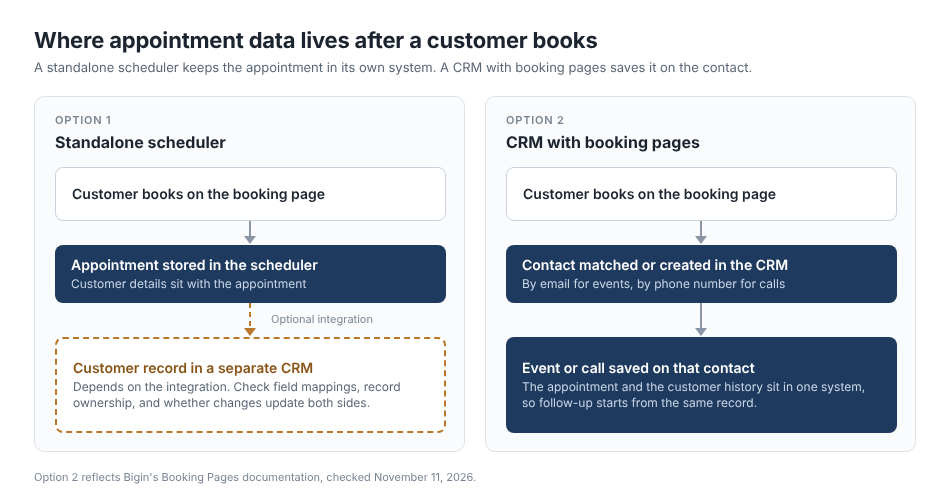
Figure 2. A standalone scheduler needs an integration to reach a CRM record.
Standalone schedulers can also connect to a CRM through a separate integration. Check which fields it maps, which system owns the record, and whether a reschedule updates both sides.
How much does appointment scheduling software cost?
These nine tools bill in different units. Calendly, Zoho Bookings, and Bigin charge per user. Acuity Scheduling charges per plan and caps calendars. Square charges per location. Jobber and Housecall Pro sell plans with a set number of users. ZenMaid charges a base fee plus a fee per cleaner or office manager. SimplePractice charges per plan and adds $74 per month for each extra clinician in a group practice.
The plan price is rarely the whole bill. Card processing is separate at Square, Jobber, and Housecall Pro. Text messages cost extra at ZenMaid, and resources cost extra at Zoho Bookings. The feature you need can also sit one plan up, as reminders do at Calendly and SimplePractice.
Calendly, Square, Zoho Bookings, and Bigin have free plans with fixed limits. Acuity Scheduling, SimplePractice, Jobber, ZenMaid, and Housecall Pro offer 7- to 30-day trials and no free plan.
Choose the tool that matches how your customers book
Write down what a customer does today, from first contact to payment. Then check each tool against it.
- Book an appointment as a customer, and read the confirmation message.
- Find the plan that includes every feature you need, and price that plan.
- Read how cancellations and reschedules work, and who gets told.
- Confirm that availability comes from the calendars your staff really use.
- Ask how you export customers and appointments if you leave.
- Look at what happens after the booking, including who follows up.
If the last step is your weak spot, Bigin may be a good fit. It suits a business that wants each appointment attached to a contact record, with follow-up in the same place. You can start on the Free edition with one booking page.