- Anubhav Sarker
- Published: 09/18/2025
- Last Updated: 09/29/2026
Tl;dr
For two to ten people selling to companies, Bigin by Zoho CRM and OnePageCRM are the cheapest ways to get company records, linked contacts, and a shared pipeline with owners and due dates. Pipedrive gives the most detail per deal if you pay for Growth. HubSpot fits when a free start matters more than the paid price later. Zoho CRM is the step up for contact roles, forecasts, or quotes. Salesforce Starter Suite is well-suited to a team that knows it will end up on Salesforce. Bigin is our product; the comparison treats it like the others.
CRM | Best suited to | Main B2B strength | Plan and price (per user per month, annual) | Main limitation |
Bigin by Zoho CRM | Two to ten people, lowest cost | Linked company, contact, and deal records; separate sales and delivery pipelines | Express, $7 ($9 monthly) | No contact roles or forecast module |
Zoho CRM | Teams needing roles, forecasts, and quotes | Contact roles in every edition; forecasting from the Standard edition | Standard, $14 ($20 monthly); quotes on Professional, $23 | 10 custom fields per module on Standard; more setup |
Pipedrive | Pipeline-focused sellers | Deal participants, parent and daughter organizations, rotting alerts | Growth, $39 (US monthly price not shown) | Lite lacks email sync; one organization per deal |
HubSpot | Teams that want to start for free | Contacts in several companies, parent and child companies, and every plan | Sales Hub Starter, $20 monthly ($7 promotional annual) | Roles and forecasting need the Professional plan, $90 plus $1,500 onboarding |
OnePageCRM | Teams that live by next actions | Up to 50 contacts per deal; dated next action on every contact | Professional, $9.95 monthly (annual: four months free) | Delivery pipeline and open tracking need Business, $19.95 |
Salesforce Starter Suite | Teams growing into Salesforce | Accounts, contacts, opportunities, cases in one seat | Starter Suite, $25 (monthly or annual) | No custom objects, forecasting, or quotes below Pro Suite, $100 |
US list prices from each vendor's pricing page on September 28, 2026, before tax, add-ons, and setup time.
What the CRM has to hold when the customer is a company
A B2B CRM is a sales tool where the company, the people at it, and the deals with it are separate records that remain linked. Plenty of B2B sales close in a week with a single buyer; the structure still pays off when the second deal lands in the same company record.
One illustrative business runs throughout the article: an industrial maintenance provider with two salespeople and a manager, selling service contracts to manufacturing plants. At one plant, an operations manager defines the need, and a purchasing manager approves the terms, and a second, smaller repair job is also open there. The business is made up, so I claim no results for it.
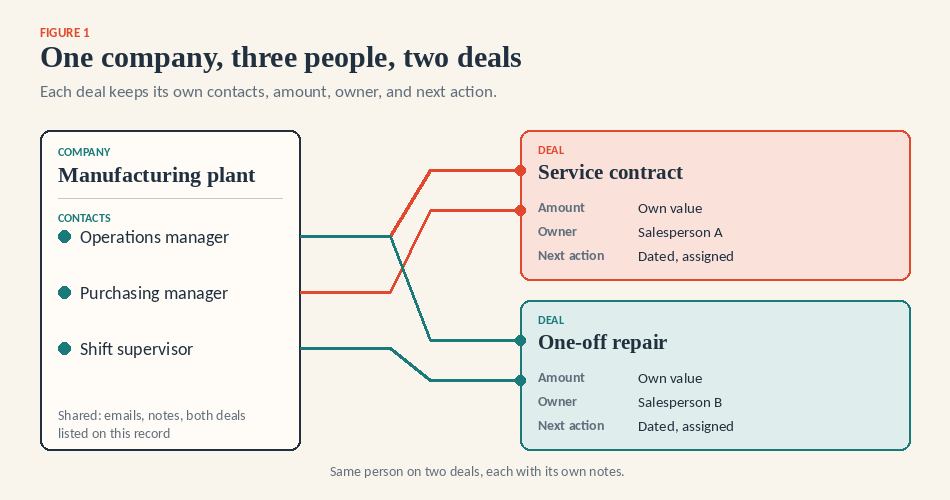
Figure 1. One company record, three people, two separate deals, each with its own contacts, amount, owner, and next action.
The six CRMs
Bigin by Zoho CRM
Bigin is for a team that wants linked company, contact, and deal records at the lowest price and does not need contact roles or forecasts. A deal has a main contact plus a Secondary Contacts field, so both plant managers sit on the contract deal, and the repair carries a different set. On Express, a workflow can create a connected record in a second team pipeline, say delivery, when a deal reaches a stage. Express is $7 per user per month annually or $9 monthly: three team pipelines, 10 custom fields per module, 30 automations, and two-way Gmail and Microsoft 365 sync. The limits: no contact-role field, no forecast module (Bigin's own FAQ says so), and no default lost-reason field, so you'll need to add a picklist.
Zoho CRM
Zoho CRM is the step up when you need to record who the decision maker is on a deal, forecast by quarter, or send quotes from the CRM. Contact Roles are in every edition, free included. Standard: $14 per user per month annually, or $20 monthly; includes multiple pipelines, email sync, forecasting, and cadences. Quotes and Blueprint process rules require a subscription to the Professional plan at $23; territories and approvals require the Enterprise plan at $40. You pay for setup time; I would budget a week. Standard caps custom fields at 10 per module, and Zoho's own pages disagree on which edition includes custom modules.
Pipedrive
Pipedrive suits a team that thinks in pipelines and wants the most detail per deal. Deals take participants beyond the main contact (no role labels), organizations can be parent or daughter, and rotting turns a stalled deal red on every plan. The entry plan is the catch. Lite, $14 per seat per month annually, has Smart BCC only. Two-way email sync, templates, tracking, automations, sequences, and the forecast view start at Growth, $39. A deal links to one organization at a time, and post-sale work needs the Projects add-on, from $16, or the Premium plan at $59.
HubSpot
HubSpot's case is the free start, plus the best account structure here. A contact can belong to several companies, a deal to many contacts and companies, and parent and child companies work on every plan. Free covers two users and 1,000 contacts. Sales Hub Starter is $20 per seat monthly; the $7 annual price is a limited-time offer for new customers. Professional is a big jump for three people: $90 per seat annually, plus a required $1,500 onboarding fee. That is where association labels (the roles), the forecasting tool, and, per HubSpot's knowledge base, sequences live.
OnePageCRM
OnePageCRM is built around one habit, which helps if follow-up discipline is your weak spot. Every contact carries a dated Next Action, and completing one prompts the next. A deal can hold up to 50 contacts, with one marked as the main contact. Professional is $9.95 per user per month, billed monthly, with four months free on annual billing: one pipeline, two-way Gmail and Outlook sync, unlimited custom fields. The Delivery Pipeline for won deals, IMAP mailboxes, open tracking, and user permissions needs Business at $19.95. Only Max ($29.95) has sequences.
Salesforce Starter Suite
Starter Suite makes sense if you expect to be on Salesforce in three years and would rather not migrate twice. For $25 per user per month, monthly or annual, you get accounts, contacts, opportunities, Gmail or Outlook integration, and case management. The limits are firm. No custom objects, 25 custom fields per object, and no forecasting or quotes below Pro Suite at $100 on an annual contract. I could not verify from Salesforce's help pages whether opportunity contact roles or account hierarchy are on in Starter; test both in the 30-day trial.
Two deals at one plant
The contract deal involves the operations and purchasing managers; the repair involves the operations manager and a shift supervisor. In all six products, both deals are attached to one company record, so notes, emails, and amounts stay separate, while the company view shows both.
The difference is in recording who does what. Zoho CRM and HubSpot Professional let you label a person as a decision-maker or influencer for a specific deal. Pipedrive, OnePageCRM, and Bigin attach several people without labels, so the role goes in a note or a custom field. Salesforce Starter is unverified here. HubSpot and Pipedrive also handle a plant owned by a parent group; Bigin has no parent-company field, so a tag serves that purpose.
Email, follow-ups, and the handoff
Logging, syncing, tracking, templates, bulk sending, and sequences are six different things, priced separately. Two-way sync on the plans in the table: Bigin Express, Zoho Standard, Pipedrive Growth, HubSpot free (one inbox), OnePageCRM Professional, Salesforce Starter. Open tracking: Bigin paid plans, Pipedrive Growth, HubSpot free with a 200-a-month cap, OnePageCRM Business. Sequences: Bigin Premier, Zoho Standard cadences, Pipedrive Growth, OnePageCRM Max, and HubSpot Starter or Professional, depending on which HubSpot page you read.
Ownership is where small teams slip. Every product puts an owner and due date on a task and lets you reassign a deal; Bigin's bulk Change Owner moves open activities with it. Pipedrive's rotting and HubSpot's default closed-lost reason property give you stalled and lost views without building anything.
The handoff after a win is the least standardized step. OnePageCRM's Delivery Pipeline, Bigin's connected record, and Pipedrive's Projects add-on each create a post-sale record with its own owner. HubSpot and Salesforce Starter use tickets or cases, built for support issues rather than delivery jobs. None of these is project management, billing, or renewal automation; a renewal is a new deal on the same company record.
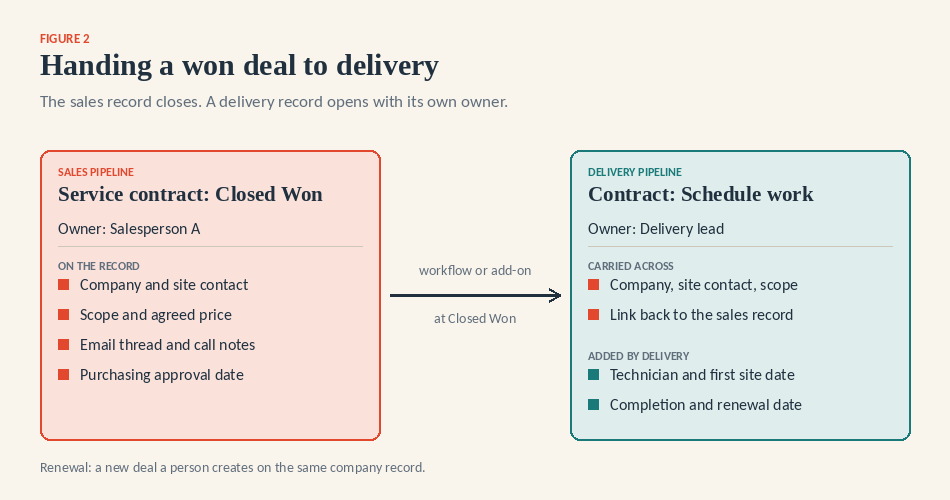
Figure 2. A won deal handed to delivery: what carries across and what the delivery owner adds.
Reporting, and the word "forecast
Every product shows deals by stage, amount, and close date. A forecast commits amounts to a period and tracks those commitments: Zoho CRM has one in Standard, HubSpot in Professional, and Pipedrive in Growth. OnePageCRM's Forecast view and Bigin's dashboards are pipeline summaries; useful, but call them that. For three people, a weekly list of deals with no next action does more.
When a free CRM is enough for B2B sales
For one person, often yes. Bigin Free is one user, 500 records, one pipeline, and three automations; Bigin's pages disagree on whether email sync is included, so assume not. Zoho CRM Free covers three users and 5,000 records without email sync. HubSpot Free is for 2 users and 1,000 contacts on a single default pipeline. Pipedrive, OnePageCRM, and Salesforce offer trials only. The moment a second salesperson needs to read the first one's emails, you are paying.
What three users pay for a year
The maintenance provider needs company and contact records, a shared pipeline, two-way email sync, and tasks assigned to named people. The cheapest plan covering all four, three users, 12 months:
CRM and plan | Per user per month | 12 months, three users |
Bigin Express | $7 annual | $252 |
OnePageCRM Professional | $9.95 monthly; annual gives four months free | $358.20 monthly; about $238.80 annual |
Zoho CRM Standard | $14 annual | $504 |
HubSpot Sales Hub Starter | $20 monthly; $7 promotional annual | $720; $252 at the promotional rate |
Salesforce Starter Suite | $25 | $900 |
Pipedrive Growth | $39 annual | $1,404 |
Arithmetic: price times three users times 12 months. Excluded: data cleanup, training, Zapier or telephony plans, Pipedrive's Projects add-on, HubSpot's onboarding fee if you move up, and tax. This is a subscription comparison, not the total cost of ownership. Pipedrive is the outlier because Lite lacks email sync; if Smart BCC is enough, Lite comes to $504.
The buying test
Run this in each trial, with the salespeople rather than the manager. It is the B2B version of our general guide to choosing a CRM.
Create the plant as a company with its three people as contacts.
Create two deals for that company: the service contract and the repair.
Attach the right people to each deal and record their role where the product allows.
Log a call on the contract deal, then find it a day later in the company record and the contact.
Give each deal an owner and a date for the next action.
Reassign the repair deal to the other salesperson and confirm the notes, emails, and tasks came along.
Mark the contract won and hand it to the technician who schedules the work, with the site contact and scope attached.
Export the company, contacts, and both deals, and check the file still shows which contact belongs to which deal.
Then the exceptions. The purchasing manager has left; mark the contact inactive without losing the emails. A duplicate company was submitted via a web form; merge it. The repair slips a quarter; move the close date and see whether it leaves this month's view.
Expect workarounds. Roles need a note in three of the six products; step 7 requires a paid plan or an add-on everywhere; and a deal export rarely lists secondary contacts. None of this shortens the sales cycle; it tells you which product your team will keep up to date.
One B2B team that switched
Texub is a B2B marketplace for IT products headquartered in Dubai, serving brands, distributors, and resellers. According to its published customer story, it moved to Bigin after finding Pipedrive costly because the features it valued were in higher editions, and HubSpot was too complex. It runs three team pipelines: revenue, onboarding, and customer support. A commercial officer assesses a buyer's needs and pricing and passes them to a seller manager; the quote then moves to the sales team, and support tickets sit in their own pipeline with the resolution noted for sales. The company reports a 30% to 40% rise in employee productivity, a customer-reported figure about productivity, not win rates. "We reviewed a lot of CRM [solutions] and selected Bigin. We're extremely happy with what we got in terms of the product," says Suchit Kumar, CEO, Texub.
Here is the maintenance provider's setup in Bigin, checked against its documentation on September 28, 2026. Create the plant in Companies and its three people in Contacts. Build sales and delivery as two team pipelines. Open each deal with a main contact, add the others in Secondary Contacts, set the Closing Date, and add a "Lost reason" picklist as one of Express's 10 custom fields. Connect each salesperson's mailbox and set customer emails to public so the manager can read them. One workflow creates a connected record in the delivery pipeline at Closed Won; another creates a follow-up task when a deal sits too long in a stage, though date-based triggers need Premier at $12.
The 15-day trial runs on Premier, needs no card, and drops to Free when it ends. Limits are on the pricing and feature availability pages. If you outgrow it, Bigin documents a move to Zoho CRM that carries users, companies, contacts, pipelines, tasks, notes, and attachments; add-ons and purchased phone numbers do not, and Zoho's two help pages list the modules differently, so read both.
Next step
Pick two products from the table and run the eight steps in both trials this week. If Bigin is one of them, start the trial and build the plant, its three contacts, and both deals before anything else.
Methodology: Every price and plan limit is sourced from the vendor's pricing or help pages and verified on September 28, 2026. No scores, tests, or interviews were run. Bigin publishes this guide.
--
Images on this article are AI generated. Please verify thoroughly before using
Common FAQs about B2B CRM
How to enrich B2B CRM data at scale?
Enrichment comes from connecting your CRM with third-party data providers, marketing automation platforms, and lead intelligence tools. Automating imports from sources like LinkedIn, email engagement, and firmographic databases helps ensure records stay current. A lightweight system like Bigin by Zoho CRM makes integrations straightforward, while larger platforms offer built-in enrichment options.
CRM vs pipeline tools: which is better for B2B?
Pipeline tools focus on visual deal tracking and task management, which works well for smaller teams. Full CRMs, however, combine pipeline tracking with automation, analytics, and multi-channel integrations. If your goal is growth, starting with a pipeline-first CRM like Bigin gives you simplicity now and scalability later through Zoho’s broader ecosystem.
Which CRM is best for B2B sales teams?
The best B2B CRM depends on company size, budget, and complexity. Teams needing robust automation and AI often lean toward Zoho CRM or HubSpot. Small to mid-sized teams that want clarity without complexity may find OnePageCRM, Pipedrive, or Bigin the better fit. Each tool has strengths, so aligning with your workflow is key.
How to choose CRM for a B2B SaaS startup?
Startups should prioritize ease of use, fast onboarding, and affordable pricing. Look for CRMs that offer pipeline visibility, email integration, and scalability without overwhelming features. Bigin and Zoho CRM are popular among SaaS startups because they provide quick setup, clean interfaces, and the ability to expand as the business matures.
What is the role of CRM in B2B buyer journeys in the USA?
In the USA, B2B buyer journeys are often complex, involving multiple stakeholders, compliance considerations, and longer decision cycles. A CRM helps by centralizing communication, tracking touchpoints across email, calls, and meetings, and giving sales teams visibility into every stage. For smaller US companies, tools like Bigin by Zoho CRM make it easier to manage pipelines without heavy setup, while larger enterprises often choose platforms such as Zoho CRM or HubSpot to support nationwide teams and advanced analytics.