- Anubhav Sarker
- Published: 01/20/2026
- Last Updated: 09/30/2026
What is cloud customer relationship management?
A cloud CRM is customer relationship management software that a provider hosts and maintains, accessed via a browser or app. It gives authorized colleagues access to shared customer records without requiring the business to run its own CRM servers. The business still has to decide what those records contain and how people use them. Today I'd like to share five examples from Bigin's case studies that make those decisions concrete. They show how customer information can remain useful when someone is absent, work changes hands, or a business connects to another system.
Your customer relationships should survive an employee's unavailability.
ProGeen, a construction company in Albania, offers a good example of why this matters. Its customer relationship continues well beyond the property sale. Technical teams then manage customization details, designs, documents, and other requirements over projects that can last two to three years.
ProGeen's published story describes colleagues using notes in Bigin to cover for absent team members, while email integration helps them follow customer conversations. The company also uses connected records and workflows to pass work from sales to its technical team.
What interests me here is how long a promise must remain understandable. A conversation that takes five minutes today could affect someone's work months later.
Imagine a customer agrees to a revised installation date, but only one salesperson knows why it changed. Recording the date alone would leave the next colleague without the explanation. A useful record would also explain the agreed scope, the reason for the change, and who needs to act. This is an illustrative situation, but it is the sort of detail I look for when evaluating a CRM.
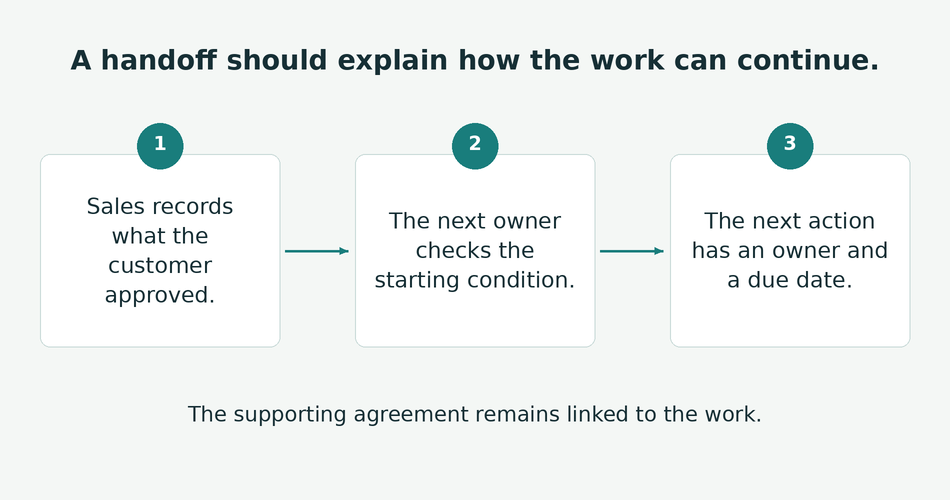
For this hypothetical job, a note could say, "The customer approved replacing both units during the same visit, and Priya will confirm the revised installation date by Friday." The approved scope and next action are now understandable. The supporting agreement should remain accessible wherever the business stores it, so a colleague can verify the details.
The cloud makes the record accessible from another desk or location. The team's recording habits determine whether that access actually helps.
A shared pipeline should make status meetings shorter and more useful
DT Consultancy supports businesses with services including company registration. Its case study describes 15 employees working across India and Bahrain, with client applications moving through several stages. Before Bigin, its daily meetings generally took an hour to an hour and a half.
After adopting Bigin, the company reported that meetings rarely lasted longer than 30 minutes. The team could see the application stages and use stage-transition rules to capture the required information before work moved forward. These are the customer's reported results, rather than a time-saving benchmark for every business.
The operational change is nevertheless useful: people could begin the discussion with the current position already visible. That is a change we care about more than the dashboard's appearance here at Bigin. If a manager still has to ask each person what happened yesterday, the team may be maintaining a CRM and a second, spoken version of the same process.
A useful review can then focus on decisions. A colleague might need help obtaining a missing document or agreeing on the next customer conversation. The CRM should make those exceptions easier to identify so that the meeting can resolve them.
Closing a sale should leave the next team with usable instructions
A growing business can have an orderly sales pipeline and still disappoint customers after they sign. The delivery team needs sufficient context to do the work sales promised.
V4 Creative, a South African digital media design business, illustrates how that transition can work. Its published setup includes pipelines for quotations, billing, payments, projects, and support. It uses Zoho Books for accounting alongside Bigin, and connected pipelines carry work into the project process after payment confirmation.
A useful handoff gives the receiving colleague the agreed work, the condition for starting, and a dated next action. One detail in this story deserves attention. The described process includes a person manually marking an invoice as paid. It would be inaccurate to present the entire arrangement as an unattended automation inside Bigin.
I find that detail reassuring because it makes the workflow easier to understand. The team has decided where software moves information and where someone confirms that a condition has been met. For your business, the equivalent might be an approved brief, a deposit, or a signed agreement. A good starting point would be to define what the receiving colleague needs before configuring the handoff. Copying a customer's name into another pipeline is only part of the job. Someone also needs to own the next action and know what authorizes them to begin.
Asking a colleague to take over without a verbal briefing reveals whether the record contains enough information to support the next action.
Field access should reduce the need to reconstruct conversations later.
GMS Systems, a materials-handling equipment business in Cape Town, uses notes within deal and project records as a shared place for discussions. Its case study also describes engineers and field staff accessing drawings, project details, and customer information through Bigin's mobile app.
The company reported a 70% reduction in internal emails after making extensive use of notes for collaboration. That result belongs to GMS Systems and reflects how its team changed its working habits.
The practical lesson SMBs should take from this example is that the place where information is recorded matters. If a project decision remains in a private email thread, another colleague has to locate that thread or ask someone to explain it.
Mobile access can help someone consult the relevant record for the work being done. The next thing I want to know is how easily they can record a useful update at that moment. A mobile app that technically opens the CRM but makes ordinary tasks awkward may leave the office team waiting for updates until the end of the day.
Where connectivity is unreliable, check which functions work offline and what happens when the device reconnects. Cloud access alone does not establish either capability.
Connecting your tools means deciding how information should move.
AdGreen, a UK sustainability organization serving the advertising industry, shows a different kind of growth. At the time of its case study, a team of four supported around 2,000 companies using its carbon calculator.
Its challenge was understanding engagement across training, events, resource downloads, and the calculator itself. AdGreen worked with implementation specialist Target Cloud to connect Bigin with other systems. Its setup uses Zoho Flow for website interactions, TrainerCentral for training information, and Zoho Analytics for combined reporting. It also uses Zoho Marketing Automation for onboarding reminders.
Consider this as an example of a deliberately connected setup. Those results should not be described as features that appear simply because someone opens a Bigin account.
Before connecting two applications, decide which one supplies each important value. The accounting system might own payment status, while the CRM holds the customer contact and responsibility for the next conversation.
Then test a change in both places. If someone corrects a contact's email address, check whether the correction reaches the other system and whether an older value could overwrite it. Someone should also be responsible for noticing when the connection stops working.
These questions are especially useful when a business adds its third or fourth application. A customer record can appear complete while still containing an outdated payment status or an event registration that has not yet synchronized. People need to know where an important value came from and when it was last updated.
The subscription should be evaluated alongside the work it requires
Cloud delivery usually removes the need to purchase and maintain servers for the CRM. It does not remove the work of cleaning customer data, setting permissions, training colleagues, or maintaining integrations.
An on-premises deployment puts more of the infrastructure work under the business's control. I would consider that option if specific hosting or integration requirements justified the cost of the equipment, technical support, and maintenance involved. A small team should make the choice around those requirements and its capacity to support the system, rather than treating either delivery model as universally better.
My comparison would cover the cost of the configuration the team will use. That includes the necessary seats and edition, along with any relevant integration subscriptions, usage charges, setup help, and staff time. A starting price tells you little if the feature that prompted the purchase is available only in another plan.
Bigin's
current pricing illustrates a specific distinction. Its Free edition supports one user, one pipeline, and 500 records. Those records include entries across pipelines, contacts, activities, and notes, so 500 records does not mean space for 500 customers plus unlimited history.
The free edition allows one person to explore the product. It cannot, by itself, demonstrate how several licensed colleagues will share work. For that evaluation, check the trial of a paid edition and its requirements.
I also separate infrastructure capacity from process fit. Being able to add another user does not establish that a product supports the account structure, reporting, permissions, or integrations the business now needs. Growth should trigger a review of those requirements, rather than an automatic purchase of more seats.
Your business still needs control over access and recovery
With a hosted CRM, the provider operates the service infrastructure. Your business still controls important choices about its data and users. Microsoft's
shared-responsibility guidance makes the same distinction for software delivered as a service: customers retain responsibility for areas including data, identities, and access management.
Check whether each colleague can see and change the information needed for their work, and whether export and administrator permissions are appropriately limited. Understand how access is removed when someone leaves and who becomes responsible for their open customer work.
Recovery deserves a separate conversation. Ask what the provider can restore, how far back recovery goes, what it costs, and how long it takes. A service's backup arrangements and your ability to recover from a single mistaken change are different questions.
Before committing, export a small sample and inspect the result. Check whether you can recover the relationships and history you need, rather than assuming that a list of contact names is a complete copy of the business's customer knowledge. Test important attachments separately.
The team also needs to agree on how urgent customer requests will be handled during an outage. The fact that software runs in the cloud does not guarantee uninterrupted access.
I would test whether someone else can continue the work.
My preferred evaluation would use a small sample representing ordinary work and a few awkward cases. I would include an active opportunity, a customer waiting for delivery, an overdue follow-up, and a record with incomplete information.
First, ask the usual owner to record the latest position. Then ask another authorized colleague to review the record without receiving a verbal briefing. They should be able to explain the customer's current request, what the business has agreed to do, and who needs to act next.
Asking a colleague to take over without a verbal briefing reveals whether the record contains enough information to support the next action.
Choosing cloud CRM based on business maturity
If they cannot, find the specific cause. The information might be missing, hidden by permissions, stored in another tool, or described too vaguely. Each problem needs a different fix.
This is also how I would train a new colleague. Give them a real situation and ask them to show how they would handle it. Someone may know how to fill out every field yet still be unsure whether to contact the customer or wait for delivery confirmation. That uncertainty belongs in the discussion of training and process.
I would avoid solving every misunderstanding by adding another required field. Sometimes the team needs a clearer explanation of an existing stage or an example of a useful note. A record should contain enough information to support the work without making routine updates so burdensome that people postpone them.
This exercise can also become a useful review after launch. For example, if colleagues can continue 16 of 20 sampled records without clarification, that is an 80% result for that sample. This is an illustrative calculation, not a CRM benchmark. I would record why the other four needed help and address those causes.
Review overdue actions alongside the result. A well-described record is valuable only if someone follows through. Over time, the team should need fewer clarification requests while continuing to meet its customer commitments. Revenue can be tracked, too, but these operational checks help explain what has actually changed.
Consider starting with Bigin with one process and one handoff.
I would start by choosing one customer process that currently depends too heavily on a particular person. In Bigin, that means creating its pipeline, agreeing on the stages, and importing a small sample of contacts and records before moving the full dataset.
Each active record needs an owner, a note capturing the customer's latest requirement, and a task with a due date. Another authorized user should then check that the required context is visible in their account.
When the process needs a second team, Bigin's
Connected Pipelines can create linked records for the next process. Check the field mapping and the receiving team's responsibilities before enabling the workflow. Connected Records require Express or a higher edition, and other limits should be checked in the
edition comparison. That is the result I would look for in a
Bigin trial: a colleague can take the next customer action confidently while the original owner is busy elsewhere.
