- Harrini Kannan
- Published: 01/30/2026
- Last Updated: 10/05/2026
What a CRM with invoicing does
A CRM with invoicing keeps the sales record and the bill for that sale connected, so whoever writes the invoice works from the customer, pricing, and deal details the salesperson agreed to. Products take two routes to get there.
The first route is built-in invoicing. The CRM creates the invoice, stores it, and tracks whether it was paid. Setup is quick, but a CRM's invoicing module is rarely a full ledger, so your accountant still needs the numbers elsewhere at tax time.
The second route is a CRM connected to a separate invoicing or accounting application such as Zoho Books, Zoho Invoice or QuickBooks Online. The CRM holds contacts, companies and deals, the finance application holds invoices, payments and the books, and an integration syncs customer and product records so you can create or view invoices from the deal. Your accountant keeps their tool, and you inherit questions about which system owns each field and how often the two sync.
A third pattern, payment links sent from the CRM with a card processor behind them, sits alongside both and moves money quickly for deposits and simple sales without replacing an invoicing system. Bigin, the CRM I work on, takes the second route and offers the third, but the decisions in the next sections apply to any product.
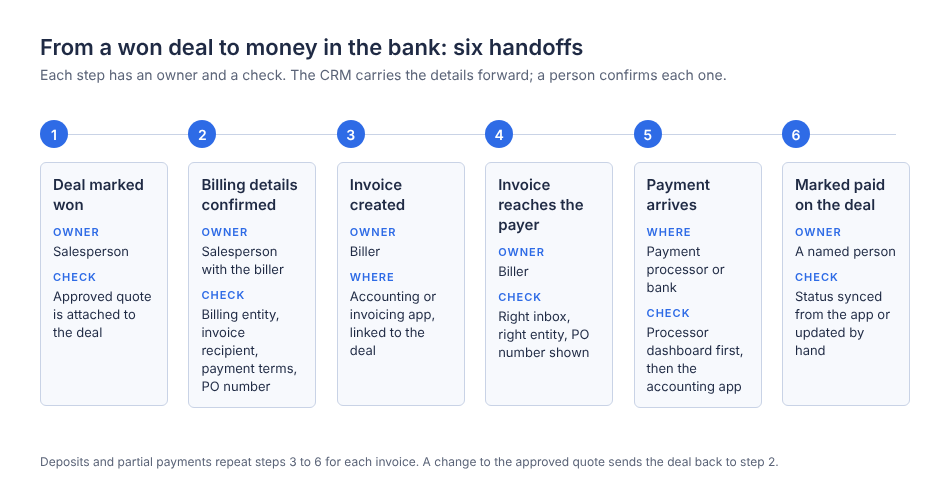
Figure 1. The six handoffs between a won deal and a confirmed payment, with the owner and the check for each step.
Five details to settle before anyone sends an invoice
Invoices stall for reasons beyond the customer's cash position. Atradius' 2026 US survey lists "slow internal approval processes," "technical issues with online payment systems," and "goods or services not delivered as promised" among the reasons customers delay, as well as the cash shortage reported by 55% of suppliers. The first three are process failures, and I think they usually trace back to one of five details nobody pinned down when the deal closed.
Scope comes first. If the quote was revised twice over email and the deal record still shows the first version, finance bills the wrong amount.
Then there is the billing customer, meaning the legal entity that owes the money. A franchise location, a parent company, or a client paying on someone else's behalf changes whose name goes on the invoice.
The invoice recipient is a separate question, because the person who said yes is often not the person who pays. A marketing manager approves a project, and an accounts payable inbox receives the bill. If the invoice sits in the buyer's inbox, the payment clock has not started.
Payment terms need the same treatment. The customer should agree to Net 30, due on receipt, or a deposit split before the invoice arrives, and the deal should hold those terms.
Finally, there is the purchase order requirement. Many larger customers will not pay an invoice that lacks their PO number, so ask for it when the deal closes rather than after the invoice bounces.
Alliance Family Mediation, a mediation practice in England, shows how one deal can carry more than one payer. Founder Julia Love runs a Client Onboarding pipeline in Bigin divided into three sub-pipelines, Client 1, Client 2 and Archived, and the published story notes that she uses Zoho Books "to send invoices and track payments from both parties." One case produces two billing relationships, each with its own invoice and payment record, and the pipeline reflects that from the start. The lesson is that the billing relationship belongs in the CRM before the first invoice is drafted.
When one deal becomes several invoices
Simple deals produce one invoice. Service work rarely does, and three situations break the assumption that one deal equals one invoice equals one payment.
Deposits split a deal into at least two invoices on different dates. A 40% deposit at signing and a 60% balance on delivery means the deal is won once, invoiced twice, and possibly paid twice on different terms. Your CRM should show both against the one deal and flag which is outstanding.
Partial payments happen when a customer pays less than the invoice amount, because they dispute one line or because a bank fee was deducted. The invoice is neither paid nor unpaid, which an accounting application handles well and a CRM status that only knows paid or pending does not.
Changes to an approved quote are the quiet ones. A client adds a deliverable midway, the salesperson agrees verbally, and the original quote is what finance bills from. A change to scope is a change to the deal record, with a revised quote attached, before work on the addition starts.
V4 Creative, a nine-person digital media design company in South Africa, runs the quote-to-payment sequence as separate pipelines. The story states that "If the customer approves the quote, the deal moves to the Billing pipeline," where estimates and invoices go out through the Zoho Books integration. In the Payments pipeline, "Zoho Books provides a payment gateway integration so that customers can pay directly via a link." The detail I find most useful follows: "If the payment is received, the deal moves to the next stage and users manually mark the invoice as paid." The company reported a 40% productivity increase within a year, but the point here is that a person still confirms the payment and updates the record.
Four numbers that get confused
Once a deal has several invoices and a partial payment, four figures drift apart, and reporting goes wrong when someone treats them as one number.
Take a hypothetical example with no real company behind it. A design studio closes a website project for $12,000. It invoices a $4,000 deposit, which the client pays. It then invoices the remaining $8,000 on delivery. The client pays $5,000 and withholds $3,000 while querying a line item. Meanwhile, the client approved a $1,500 add-on by email that nobody has invoiced.
At that moment, the won value is $12,000 in the CRM, or $13,500 if someone updated the deal for the add-on. The amount invoiced is $12,000. The outstanding balance is $3,000. The amount collected, meaning money that has reached the bank, is $9,000. And $1,500 of approved work has not been billed at all.
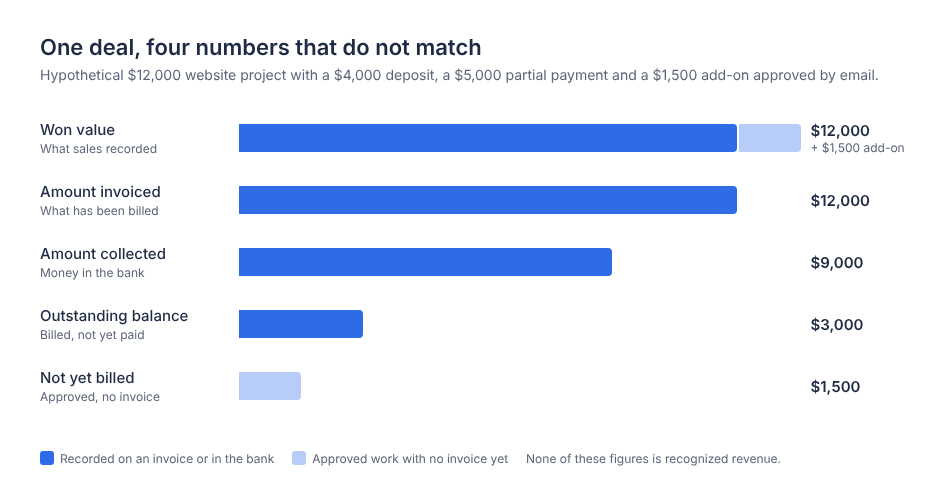
Figure 2. The hypothetical $12,000 project shows how the won value, the amount invoiced, the amount collected, and the outstanding balance diverge once a deposit, a partial payment, and an uninvoiced add-on exist.
None of these is recognized revenue. That depends on your accounting method and on when the work is delivered, which is your accountant's call. What a connected CRM can do is show the four figures side by side on the deal, so the salesperson, the biller, and the owner argue about the same numbers.
When the money does not arrive
Three things go wrong after an invoice is sent, and each has a different owner.
An overdue invoice is first a question for whoever sent it, who should check that it went to the right recipient and carried the PO number if one was required. Then the deal owner, who has the relationship, makes the call, because a reminder from a known person gets answered sooner than one from an invoicing system.
A disputed amount belongs to the salesperson and whoever delivered the work, because the dispute is nearly always about scope. They pull the approved quote and any change record from the deal and compare it line by line with the invoice. With the quote history on the deal, this takes minutes. With it scattered across email threads, it takes days.
A payment that has not appeared in the connected system is the one that panics people. Before anyone chases, check three places: the payment processor dashboard for a completed transaction, the accounting application for a recorded payment, and the last sync time between the two systems. Card payments settle a day or more after the customer pays, and integrations sync on a schedule. The Zoho Books help documentation describes Bigin records syncing into Zoho Books every two hours after the initial sync. A missing payment is often a payment that is on its way.
Aileron Travels, a 14-person travel agency, reports in its published story that invoice processing fell "from weeks to just two days" after the team moved from spreadsheets to Bigin, with quotes, vouchers and invoices dispatched through the email integration, and it credits the change with improved cash flow. The story describes pipelines and automated email dispatch as what changed. It describes the Zoho Books integration as a plan, so that integration gets no credit for the two days.
How Bigin fits, application by application
I work in Bigin, so read this section as a product explanation rather than a neutral review.
Bigin holds contacts, companies, products, and pipeline deals, and does not create invoices on its own. Invoicing arrives through one of three integrations, all included in the Express, Premier, and Bigin 360 editions. The Free edition is limited to a single user and does not include those integrations or payment links. Express is $7 per user per month billed annually or $9 billed monthly, Premier is $12 or $15, and Bigin 360 is $18 or $21.
Zoho Books is a full accounting application. The integration syncs Bigin contacts and companies to Zoho Books customers and Bigin products to items. You can then create invoices, estimates, and sales orders from Bigin, view them on the related record, and associate them with pipeline deals. One caution from the help documentation is that a record deleted in Bigin is also deleted in Zoho Books. Zoho Books has a free US plan for businesses under $50,000 in annual revenue, with paid plans from $15 a month billed annually.
Zoho Invoice uses the same integration path and is free, with a cap of 500 invoices a year, two users and "Powered by Zoho Invoice" branding. It handles invoicing, estimates, and payment tracking without a general ledger.
QuickBooks Online fits when your accountant already lives there. The integration is two-way for customers and items and is available on the US, Canada, EU, and Australia data centers. You can create and track invoices and estimates from a pipeline record or a contact, and they stay linked to the deal. Product mapping requires seven mandatory fields, so expect to add custom fields in Bigin first. QuickBooks Online pricing in the US lists Simple Start at $38 a month.
Bigin payment links are the collection layer. From a Pipelines record, you set an amount, a due date, and an optional grace period, then send the link. Gateways, including Stripe, PayPal and Zoho Payments, are configured through Zoho Checkout. They work in all paid editions on the US, India, EU, Australia, Canada and UAE data centers, and only on the Pipelines module. Each payment shows as Pending, Received, Failed, Overdue or Expired, and workflows can fire on the Created, Amount Paid, Overdue and Expired events. When a payment succeeds, the help documentation states that "an email containing the invoice as an attachment will be automatically sent to the customer." That document comes from the checkout layer and does not post to your general ledger, apply against an open Zoho Books or QuickBooks invoice, or handle credit notes, so a business that needs those still needs an accounting integration.
Processing fees come from the gateway, not from Bigin's plan. On October 5, 2026, Stripe and Zoho Payments both listed 2.9% plus 30 cents per domestic online card transaction in the US and 0.8% capped at $5 for ACH, and PayPal listed 3.49% plus 49 cents. On a $4,000 deposit, that is about $116 by card or $5 by ACH, so offer bank transfer on larger invoices.
Lisbon Sintra Tours, a travel agency in Portugal, runs the lighter combination. The published story says the Zoho Invoice and Stripe integration "further simplifies the invoicing and payment collection process," and founder Robin Savile reported saving about five hours a week with Bigin overall. I would not pin those hours on invoicing, because the story also credits tasks, Signals notifications, email templates, and dashboards. It does show a small operator running invoicing on a free application plus a card processor.
A setup sequence worth running before you commit
Pick the edition and the connected application first. Decide which system owns each field, and edit customer details in one place only. Add the billing fields to the deal: billing entity, invoice recipient email, payment terms, and PO number. Set permissions so the person who bills can see every deal's quote history while the salesperson cannot mark an invoice paid. Then run three tests on an internal test record.
Start with a normal invoice. Create it from a won deal, send it to the recipient on the record, and record the payment in the connected application. Success means the invoice appears on the deal in Bigin with the right customer, amount, and terms, and the paid status shows after the next sync without retyping.
Then record a partial payment for less than the invoice total. You want the accounting application to show the invoice as partially paid with the correct balance, and the person looking at the deal in Bigin to see that balance or open the invoice to find it.
Last, force a failed or delayed update. If you are using payment links, let a test payment fail or expire and confirm that the status changes and that any workflow built on Overdue or Expired fires. If you are using an accounting integration, edit a customer in the CRM and time how long the change takes to appear on the other side. Success is knowing the lag and writing it down where your team can see it, so nobody declares a payment missing an hour after it was made.
Where to start
What the four customer stories share is that quotes, billing details, and payment status lived on the same deal, and a person owned each handoff, including the unglamorous one where someone confirms the money arrived and marks the invoice paid. Bigin's Express edition includes all three accounting integrations and payment links. You can start a free trial, connect the application your accountant already uses, and run the three tests above before you move a single real customer.