- Tamanna Kovoor
- Published: 01/27/2026
- Last Updated: 10/22/2026
The answer is yes for some agents and no for others. I work at Bigin, so I have a stake in that answer. So I checked every free plan in this article against the vendor's own pricing or help page on October 22, 2026, and I have written down the limits that matter, including ours.
Most "free" real estate CRMs are trials, not free plans
The first thing to know is that CRMs built specifically for real estate rarely offer a free plan. Follow Up Boss, one of the best-known, offers a 14-day trial, then charges $58 per user per month on an annual plan or $69 per user per month on a month-to-month plan (Follow Up Boss pricing). One widely read "best free real estate CRM" article lists five products, and its own comparison table shows a free trial, not a free plan, for all five.
A free trial gives you 14 to 30 days. A free plan has no end date. If you are searching for "free CRM for real estate," you almost certainly want the second kind, and the second kind is almost always a general small business CRM with a real estate template or custom fields layered on top. That is the category this article compares.
A free CRM download means the mobile app, not an installer
Many searches for this topic include the word download. The answer is a little disappointing, so I will give it plainly.
Every CRM in this article runs in a web browser, and your data lives on the vendor's servers. There is no installer for Windows or Mac that holds your contacts on your own hard drive. The thing you download is the mobile app. Bigin, for example, has apps for iOS, iPadOS, Android, and macOS (Bigin mobile app), and HubSpot, Zoho CRM, Freshsales, Bitrix24, Agile CRM, and EngageBay all publish iOS and Android apps too. For an agent who spends the day at showings, the app is the product. The browser version is for Sunday evening cleanup.
If you want software you install and control yourself, you are looking at open source CRMs such as SuiteCRM or EspoCRM. They cost nothing to license, but you need a server, someone to set them up, and someone to apply updates. For a solo agent or a two-person team, the time usually costs more than a paid plan would.
Seven free CRM plans compared: users, records, and the first paid tier
Each row below comes from the vendor's own pricing or help page. Limits change often, so treat the vendor page as the final word.
CRM | Free users | Records or contacts | Limits that bite first | First paid tier |
|---|---|---|---|---|
Bigin (Free) | 1 | 500 records | One team pipeline, three automations, five email templates, one web form, no email account sync. | Express at $7 per user per month billed yearly, or $9 billed monthly. |
HubSpot (Free tools) | 2 | 1,000 contacts | 2,000 marketing emails a month with HubSpot branding on emails, forms, and live chat. | Sales Hub Starter from $7 per seat per month on an annual commitment, higher month-to-month. |
Zoho CRM (Free) | 3 | 5,000 records | Five workflow rules, 150 emails a day, one web form per module, no email account integration or multiple pipelines. | Standard edition, priced on Zoho's pricing page by region. |
Freshsales (Free) | 3 | Not stated | Automation, sales sequences, and AI contact scoring sit on paid plans. | Growth at $9 per user per month billed annually, $15 billed monthly. |
Bitrix24 (Free) | 1 to 2 per the plan card | Not stated | 5 GB storage, basic CRM only, telephony and marketplace apps are paid. | Basic at $49 per organization per month, billed annually for five users, $69 monthly. |
Agile CRM (Free) | 10 | 1,000 contacts and companies | One automation rule, one campaign workflow, no two-way email sync. | Starter at $8.99 per month. |
EngageBay (Free) | 15 | 250 contacts | 1,000 branded emails, five custom fields, two email sequences, one landing page. | Basic at $14.99 per user per month, $13.79 billed yearly. |
Sources: Bigin pricing and Bigin feature availability, HubSpot pricing, Zoho CRM free edition guide, Freshsales free CRM and Freshsales pricing, Bitrix24 pricing, Agile CRM pricing, EngageBay pricing.
Two notes on the table. Bitrix24's pricing page says the free plan is for one to two users on the plan card and "unlimited" in its FAQ, so ask before you build a team on it. Zoho CRM's free edition guide says 5,000 records in one place and mentions a 1,000-record figure in another, and the 5,000 figure appears more often.
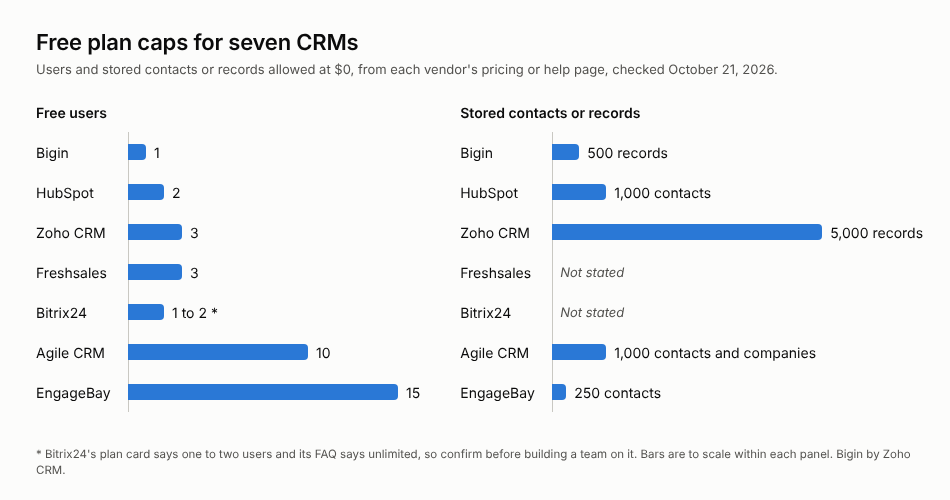
Free plan caps for seven CRMs by users and stored contacts or records.
The three limits that end a free plan first
A user count is the number most vendors put in large type. For a real estate agent, it is rarely the limit that ends the free plan. Three others usually get there first.
The record cap is the one to use for the math. A record is a contact, a company, or a deal, and in most CRMs each of those counts separately. An agent with 300 people in their sphere, 40 active buyer and seller files, and the companies those people work for has used roughly 400 records before adding a single lender or inspector. Bigin's free plan stops at 500 records. HubSpot stops at 1,000 contacts, with other object types counted separately. Zoho CRM's 5,000 is the most generous of the general tools. If you have been in the business for 10 years and have a long referral list, start with the record limit and work backward.
Email sync is the second limit. On the free tier, Bigin, Zoho CRM, and Agile CRM do not connect your Gmail or Outlook inbox to the contact record. You can send templated emails from the CRM, but a reply from a client lands in your inbox, not on their record. For many agents, that is the whole reason to have a CRM. HubSpot includes inbox connection on the free tier and puts its branding on the emails you send.
Automation count is the third. Bigin's free plan allows three workflow rules, Zoho CRM's allows five, and Agile CRM's allows one. Three rules is enough for a new lead task, a closing follow-up, and a review request. It is not enough for separate buyer and seller sequences plus anniversary reminders. If you want the CRM to handle your follow-ups, you will outgrow a free plan within a few months of using it properly.
Four things a real estate CRM has to hold
A CRM template can only help if it matches how a deal moves. The core of a real estate CRM is two pipelines, one for buyers and one for sellers, with stages that match your actual process. A buyer pipeline might run from inquiry to pre-approval, showings, offer, under contract, and closed. A seller pipeline might run from valuation request to listing appointment, listed, under contract, and closed. Bigin's real estate template ships with stages that follow a deal from the first inquiry through site visits, negotiation, attorney review, and closing, and you can rename any of them (Bigin real estate template).
The second thing the CRM has to hold is property interest. Buyers rarely want one house. They want a price band, a school district, and three bedrooms. The CRM should record that on the contact so you can match new listings to people. On a free plan, you will do this with custom fields, and the number of custom fields is capped. EngageBay allows five on its free plan. Bigin allows five per team pipeline. Decide which fields matter before you spend them.
The third thing is the long follow-up. NAR's 2025 Profile of Home Buyers and Sellers, based on transactions between July 2024 and June 2025, found that 88% of buyers purchased through an agent and 91% of sellers used one (NAR). The agents those people pick next time are the ones who stayed in touch. A CRM with a closing date on every deal and a task that fires 11 months later is the simplest way to do that, and it is where the automation cap starts to matter.
Lead capture is the last piece. In NAR's 2025 Technology Survey of more than 1,200 agents, 23% named a CRM as one of their top lead-generating tools, behind social media at 39% (NAR). Social media generates inquiries, and the CRM is where those inquiries must land. Most free plans give you one web form, which is enough for a "request a valuation" form on your site. Portal leads from Zillow or Realtor.com still arrive as emails, and on a free plan without inbox sync, you will copy them in by hand.
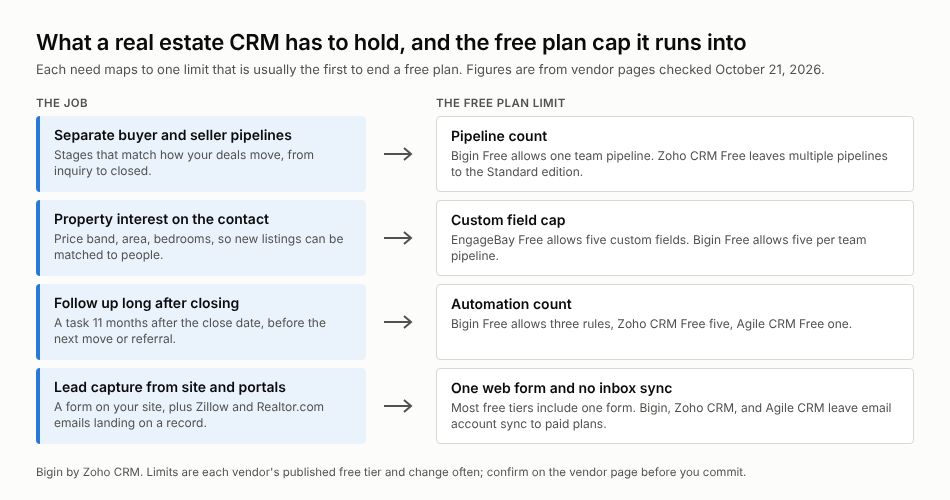
The four things a real estate CRM has to hold, and which free plan limit each one runs into.
Eden Ridge Limited: a 20% sales increase after leaving spreadsheets
Eden Ridge Limited is a Kenyan real estate company that verifies and validates properties and offers financing to clients. Its CEO, Jack Wafula, managed the client and lead databases in spreadsheets via manual entry. As the company grew, staff turnover left the data inconsistent and slow to update, and the firm began losing opportunities to outdated records and late follow-ups (Eden Ridge's story).
Wafula puts the cost plainly: "Due to the absence of a seamless data management process, you could lose a lot of clients." He adds, "From my perspective, this represents an even greater cost compared to the expense of having a system in place."
After moving to Bigin, the team used its pipelines and dashboards to keep follow-ups on time. Eden Ridge reports a 20% increase in sales, which it attributes to timely follow-ups through the CRM. That figure is the company's own, and I cannot tell you how much of it came from the software versus a growing market. What I can say is that the problem Eden Ridge describes, late follow-ups caused by stale records, is the exact problem a CRM exists to fix, and a free plan fixes it as well as a paid one until you hit a cap.
When a free plan starts costing you time
Free plans cost nothing in cash and something in time. There is a point at which the second cost exceeds the first.
You have reached it when you are deleting old contacts to stay under a record cap, forwarding client emails to yourself to remember a conversation, or keeping a second list in a notes app because the CRM would not let you add a field. Each of those is a sign that the plan is now costing you an hour a week, and an hour of an agent's time is worth more than the price of the first paid tier.
Those first tiers are not expensive. Bigin Express is $7 per user per month, billed yearly, and raises the record cap to 50,000, adds three team pipelines, 30 automations, email and WhatsApp integration, and mass email (Bigin pricing). HubSpot's Sales Hub Starter starts at $7 per seat per month on an annual commitment. Freshsales Growth is $9 per user per month billed annually. Bitrix24 Basic is $49 per month for an organization of five. If a team of two is paying $14 to $18 a month for a CRM that holds every client and every conversation, the free plan was never the saving it looked like.
Two things are worth checking before you pay anyone. First, confirm that your data moves with you. Every CRM in the table exports to CSV, though Zoho CRM's free edition caps exports at 10, so a free plan is not a trap. Custom fields and pipeline stages do not travel, and you will rebuild them. Second, confirm what the paid tier does not include. In Bigin, WhatsApp and email account integration start with Express, and date-based workflow rules for anniversary reminders start with Premier at $12 per user per month, billed yearly. Read the feature availability page for the edition you plan to buy, not the marketing page.
Where Bigin's free plan fits
Bigin's free plan is a single-user plan with 500 records, one team pipeline, three automations, and the mobile apps. It is a fit for a solo agent with a small sphere who wants to stop losing follow-ups and does not yet need email sync. The real estate template page says the free plan covers lead tracking, pipeline management, and basic automations, and this guide to running a real estate business in Bigin walks through how agents use it for documents, calls, referrals, and dashboards.
The 15 day trial needs no credit card and drops to the free plan when it ends. Load your real contacts into it, set up your three most important automations, and watch the record counter. By day 15, you will know which plan you need.
FAQs
What is free real estate CRM software?
Free real estate CRM software is a tool that helps agents manage leads, contacts, properties, and follow-ups without paying upfront costs. It centralizes client information and provides visibility into active deals.
Who should use free real estate CRM software?
Free real estate CRM software is ideal for independent agents, small brokerages, and new real estate teams that want to organize inquiries and track transactions without investing in paid tools.
What features are included in free real estate CRM software?
Most free real estate CRM platforms include contact management, lead tracking, deal pipelines, activity reminders, basic reporting, and mobile access. Some also offer property notes and document uploads.
Can free real estate CRM software support multiple listings?
Yes. Free real estate CRM software allows agents to track multiple property listings and associate buyers or sellers with each property. This helps manage site visits, feedback, and negotiations efficiently.
How does a CRM help real estate agents close more deals?
A CRM helps agents close more deals by improving response time, organizing follow ups, maintaining buyer history, and ensuring no enquiry goes unattended. Consistent tracking increases conversion rates.
Is free real estate CRM software suitable for mobile use?
Most modern free real estate CRM tools offer mobile apps or mobile browser access. This allows agents to update deals, respond to leads, and manage activities while on the move.
Can agents upgrade from a free CRM later?
Yes. Free real estate CRM software is often designed as a starting point. As business volume grows, agents can upgrade to access advanced automation, reporting, and integrations without migrating data.
Does Bigin offer free real estate CRM software?
Bigin offers a free option with a ready-made real estate template. It allows agents to start quickly with predefined pipelines, fields, and workflows designed for real estate transactions.