- Samira Fernandez
- Published: 01/27/2026
- Last Updated: 09/16/2026
The seven strategies below serve two kinds of businesses. Some sell through an online checkout: a candle maker on Shopify, a parts supplier with a web store. Others win customers through inquiries, quotes, or appointments: a landscaper, a bookkeeper, an online tutor. The moves are the same in shape and different in detail, so each section says where the two paths split.
The four numbers, and why more traffic is not the same as more sales
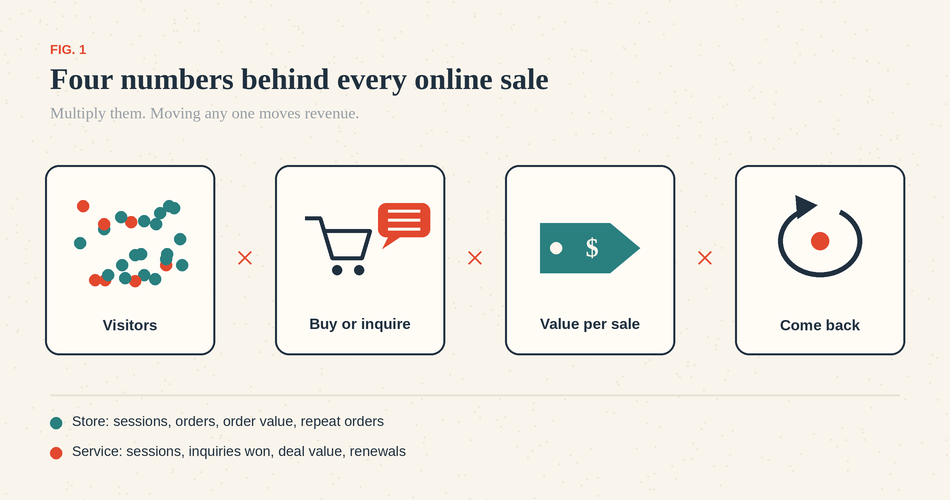
A conversion rate is the share of people who took the action you wanted, divided by everyone who could have, over a fixed period. The denominator changes what the number means. For a store, purchase conversion is orders divided by sessions in a month. For a service business, inquiry conversion is form submissions or calls divided by sessions, and a second number, qualified leads to sales, is customers won divided by qualified inquiries received in the same month or quarter. Keep the two apart; a site can be good at generating inquiries and poor at closing them.
Take an illustrative store with invented figures: 2,000 sessions a month, 2% conversion, $60 average order, so 40 orders and $2,400. Doubling traffic to 4,000 sessions doubles revenue, but paid traffic at $1 a click costs $2,000. Lifting conversion to 3% by fixing the checkout produces 60 orders and $3,600 from the same visitors, and nudging the average order to $70 adds $600 more. An inquiry business runs the same math with different denominators: 300 sessions, 5% inquire, 40% of those become customers at $900 each, so six customers and $5,400. Shave the response time and close 50%, and it is $6,750 with no new visitors at all.
1. Attract visitors who already want what you sell
The cheapest traffic to convert is people searching for what you offer, using the words they use, near where you are. Start with the questions customers ask before they buy: "How long does a cabinet refinish take?" "vegan candle safe around cats," "what does a bookkeeper cost for a small LLC?" Each is a page or a section you can write in an afternoon, and it brings a smaller, better crowd than a broad post on industry trends.
For a business that serves a local area, the Google Business Profile handles many first contacts before the website does. Google says local results are based mainly on relevance, distance, and prominence, and that the actions that help are the unglamorous ones: verify the business, keep hours and categories accurate, add photos, and respond to reviews (Google Business Profile help). Google also says there is no way to pay for a better local ranking.
Measure it in Google Search Console: clicks from non-brand queries to the pages you wrote, month over month. The trade-off is time; search traffic builds over months, so start this first and judge it last.
Use content to support buying decisions
A visitor who cannot find the price, shipping cost, delivery time, or return policy does not email you to ask. They leave. Baymard Institute's research on checkout abandonment, which averages 50 studies to a 70.22% abandonment rate, finds that the single most cited reason for leaving during checkout is extra costs that were too high (40% of shoppers who abandoned), followed by slow delivery (20%), and a further 12% left because they could not see the total cost up front (Baymard Institute). Those are information problems as much as pricing problems.
For a store, that means the product page states the price, shipping cost, or threshold, delivery window, and return terms before the cart. If you cannot provide an exact shipping amount, state the rule ("$6 flat, free over $75"). For a service business, the buying information is different, but the failure is identical. Say what the first step is (a 20-minute call, a site visit, a written quote), how long it takes, and whether it costs anything. If you have a price range, publish it; buyers an honest range filter out would have cost you a call anyway.
Measure this with the step just after the page: add-to-cart rate for products, or form starts and calls for services, both per session, over a month. If those rise and completed sales do not, the problem is further down.
3. Take the friction out of checkout and inquiry
Two things kill a purchase the customer has already decided on: a checkout that demands more than it needs to, and a page that behaves badly on a phone. In the same Baymard survey, 18% of abandoners left because the site wanted them to create an account, 17% because the checkout was too long or complicated, and 17% because of errors or crashes. Guest checkout, address autofill, a visible order total, and the wallets people already use (Apple Pay, Google Pay, PayPal) cover most of that list.
On speed, Google's Core Web Vitals give thresholds to aim for rather than guess at: largest contentful paint within 2.5 seconds, interaction to next paint under 200 milliseconds, and cumulative layout shift under 0.1, each measured at the 75th percentile of page loads (web.dev). Run your checkout and contact page through PageSpeed Insights, and fix the worst issues.
For inquiry forms, the advice "fewer fields always convert better" is too blunt. Ask for what you need to give a useful reply and nothing more. A remodeler needs a zip code and a rough scope; a tutor needs the student's grade and the subject. Those fields reduce back-and-forth and filter out inquiries you could never serve. Fields you add because the sales team might like them later are the ones to cut. Measure checkout completion (orders divided by checkouts started) or form completion (submissions divided by form starts) over the month.
4. Answer objections with proof, where the objection happens
Nineteen percent of Baymard's abandoners did not trust the site with their card. Trust is built by specifics placed at the moment of doubt. Place a review mentioning delivery speed next to the shipping estimate. Place the return policy next to the buy button. Put a photo of the real team on the quote page. Use names, dates, and locations in testimonials, with permission.
Decision content earns its keep here, too. A comparison page that says your product is the wrong choice does more to build trust than one that claims it fits everyone. Short FAQs written from the questions your inbox already receives ("Do you work with QuickBooks Desktop," "Can I return an opened jar") remove the reasons people give for waiting.
The measure is indirect: conversion rate on the pages where you added proof, and the share of inquiries that arrive already sold. The trade-off is maintenance. Reviews go stale and policies change, so date them.
5. Follow up on inquiries and unfinished purchases
For inquiry businesses, this is the strategy with the fastest payoff. An inquiry that waits two days is competing with other quotes by the time you answer. Decide who owns each new inquiry, set a target for the first reply (the same business day is achievable for most small teams), and record the next action every time you touch the lead. The bookkeeping is the strategy: the business that follows up twice, on schedule, beats the one that follows up once, brilliantly.
For stores, abandoned-checkout emails recover a share of the carts described above. Most e-commerce platforms and email tools send them; keep the first reminder to the cart contents and a link back. Test whether a discount is needed before offering one, because a standing discount trains regulars to abandon on purpose.
Follow-up has to be lawful. In the US, the CAN-SPAM Act does not require opt-in consent before a commercial email, but it does require an honest subject line and header, a physical address, a clear way to opt out, and honoring opt-outs within 10 business days, with penalties of up to $53,088 per email (FTC compliance guide). Marketing text messages are stricter: FCC rules under the TCPA require prior express written consent for autodialed or prerecorded marketing calls and texts to mobile numbers, and revocation by any reasonable means, including replying "stop," must be honored within 10 business days (47 CFR 64.1200). A reply to a customer's own inquiry is treated differently, but settle the consent question before a form starts feeding a text campaign. State laws can add requirements.
Measure first-response time in hours and the share of inquiries that become customers within 30 days. For carts, measure recovered orders as a share of abandoned checkouts.
6. Earn the second order
A repeat customer costs nothing to acquire, already trusts you, and is one of the four most valuable sites that small businesses never look at. Define it first: repeat rate is the number of customers who make a second purchase within a chosen window (say, 180 days), divided by the number of customers whose first purchase falls in a given month. Pick the window based on how often the product gets used. Coffee is monthly; a mattress is not.
For consumables, a replenishment reminder timed to the product's real life, with the exact item and a one-click reorder, beats any newsletter. For everything else, a post-purchase email that helps the customer use what they bought earns the right to a later offer. Service businesses have their own version: the next appointment booked before the customer leaves, the annual review scheduled in the CRM the day the job closes, the renewal reminder sent 30 days out.
Do not discount everyone; a loyal buyer given 20% off is a margin you gave away. The trade-off is patience, because the repeat rate lags by a full window.
7. Find the bottleneck, then fix that first
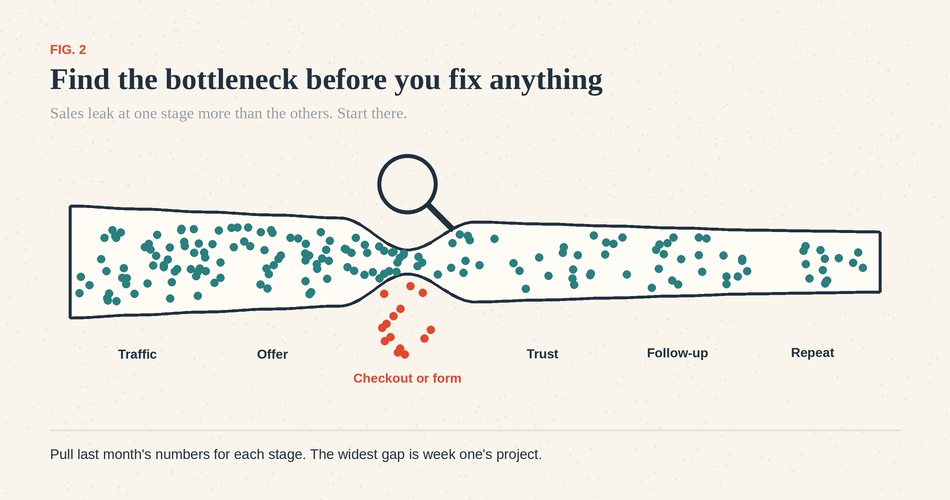
Every strategy above has a measure attached because the order in which you do them should be guided by your numbers. Small businesses rarely have enough sessions to make small differences readable. If your checkout saw 60 starts last month, a jump from 20 to 24 orders is noise. Judges over a quarter, and prefer big, obvious changes to small tests.
Two free tools cover most of it. Google Search Console shows which queries bring visitors and which pages they land on. Google Analytics 4 shows what those visitors did, once you set up purchase or form-submission events. Read them weekly, at the same time, for 20 minutes. An inquiry business adds a third source: the CRM, where response time, inquiry-to-customer rate, and stalled leads live.
Where sales are leaking | What the numbers look like | Start with |
|---|---|---|
Traffic | Few sessions, but a healthy conversion rate | Strategy 1 |
Offer clarity | Sessions, but few add-to-carts or form starts | Strategy 2 |
Checkout or form | Add-to-carts or form starts, but few completions | Strategy 3 |
Trust | People browse, compare, and leave | Strategy 4 |
Follow-up | Inquiries arrive, then go quiet | Strategy 5 |
Repeat | First orders, no second orders | Strategy 6 |
What to do in the first week
Do not start seven projects. Day one: set up Search Console and GA4 events if they are missing, and pull last month's numbers for the table above. Day two: find the widest gap. For many inquiry businesses, it is follow-up, so give every new inquiry an owner, a same-day reply target, and a next action in one place. For many stores, it is checkout, so turn on guest checkout and wallets, and put the shipping cost on the product page. Day three: the buying information in strategy two, because it is cheap. Leave strategies one, four, and six for weeks two through four, and revisit the table at the month's end.
What this looked like for one online business
Chess Gaja, a chess academy founded in India in 2019, teaches entirely online and, according to its Bigin customer story, has trained more than 5,000 students across more than 20 countries with 30 coaches. Its inquiries come through forms embedded on its website. Before, data lived in Google Sheets and WordPress, and the team struggled to track trial classes against paid packages.
The setup it describes is the follow-up strategy above made concrete: form submissions become records automatically, workflows route each lead to a domestic or international pipeline, and sub-pipelines track students moving from trial class to paid package. The academy reports that its response time to customers fell from three hours to one hour, that new lead capture rose 20% after moving to built-in forms, and that faster turnaround through WhatsApp coincided with a 10% rise in inquiries. Those are the customer's own figures, reported after several changes made together, so read them as one business's experience rather than a benchmark.
Keeping inquiries and next actions in one place
Quick Disclosure: Bigin is our product. It does not run your checkout, send abandoned-cart emails, or manage your ads. It centralizes the inquiry side of this guide, which is where most service businesses lose sales; other pipeline management tools can do the same.
A workable setup takes an hour. Create a web form for your site; submissions become a contact and a pipeline record with no retyping. Add a workflow that assigns each new record an owner and creates a follow-up task due the same day. Record the next action after every call or email. Once a week, open the pipeline and look for records with no activity in seven days. The Free edition allows one user, 500 records, one pipeline, one web form, and three workflow rules; Express, at $7 a user a month billed annually ($9 monthly), raises those to 50,000 records, three pipelines, three forms, and 30 workflows, and adds email templates and mass email, per the feature availability page and pricing page, checked September 16, 2026. Stores can add the free Shopify for Bigin integration, which syncs orders, customers, and products into a dedicated pipeline; it does not recover abandoned carts.
If your bottleneck is follow-up, start the 15-day trial, build the form and the one workflow, and check your response time in a month.
--
Edited by Anubhav Sarker | Images on this article are AI generated. Please verify thoroughly before using