- Harrini Kanan
- Published: 0/30/2026
- Last Updated: 11/17/2026
Inventory and sales software should match the records you need to control
When a customer asks for a product, a quantity, and a delivery date, you have to answer two questions before you can reply: what exactly have you agreed to sell, and do you have enough of it in stock to deliver on time? Sales software helps you answer the first question, and inventory software helps you answer the second.
The term inventory and sales software for small businesses covers both. If you need to track stock quantities, reserve units for orders, raise purchase orders, or know when to reorder, you need software built for those tasks. If you only need to keep track of which products each customer asked about, where each deal stands, and who has to follow up, a CRM with a product catalog may be enough.
Before you compare products, write down the problem you want the software to fix. Selling items that turn out to be out of stock is an inventory problem, and losing deals because nobody followed up on a quote is a sales problem.
Bigin is a CRM that lets you keep a product list and attach products to deals. It is not an inventory system, and this guide does not present it as one.
The prices and plan details in this guide come from each vendor's own pages, checked on November 17, 2026, and all prices are in US dollars.
A product catalog tells you what you sell, while inventory records tell you what is available
Three different things are often referred to as inventory and sales software: a product catalog, a sales pipeline, and an inventory system.
A product catalog is a list of what you sell, with a name, a code, a description, and a price for each item, and it says nothing about how many units you have.
A sales pipeline tracks each deal from the first inquiry to the final decision. It shows which products and quantities the customer requested, which stage the deal is at, and who is responsible for the next follow-up.
An inventory system counts the units you have and records every transaction that changes the count, such as a delivery from a supplier, a shipment to a customer, or a return. It also separates the count into different quantities. Stock on hand is everything you physically hold; committed stock is the portion you have already promised to customers; available stock is what remains for new orders; and incoming stock is what you have ordered from suppliers but not yet received.
Vendors do not all define these quantities in the same way, so ask each vendor which transactions change each quantity. Zoho Inventory calculates the quantity available for sale as stock on hand minus committed stock, while QuickBooks Online says it "decreases what's on hand by the amount on the invoice or sales receipt."
The question the business needs to answer | The record or capability required | The type of system to evaluate |
|---|---|---|
What do we sell, and at what price? | Product names, codes, descriptions, and prices | A CRM, accounting, or inventory product with a catalog |
Where does this deal stand, and who follows up? | Deal stages, activities, and owners | A CRM with a sales pipeline |
Can we deliver this quantity now? | Stock on hand, less committed stock | Inventory software, or an accounting plan that tracks stock |
What should we buy, and when will it arrive? | Purchase orders, receiving, and reorder points | Inventory software, or accounting software with purchasing |
Has the customer been invoiced, and have they paid? | Invoices and payments | Accounting or invoicing software |
Products of the same type differ, so check the specific plan before you buy: some accounting plans do not include stock tracking.
Typing a quantity into a deal does not reserve anything, because that quantity only records what the customer asked for. A reservation is recorded in the inventory system, marking the units as committed so that nobody else can sell them.
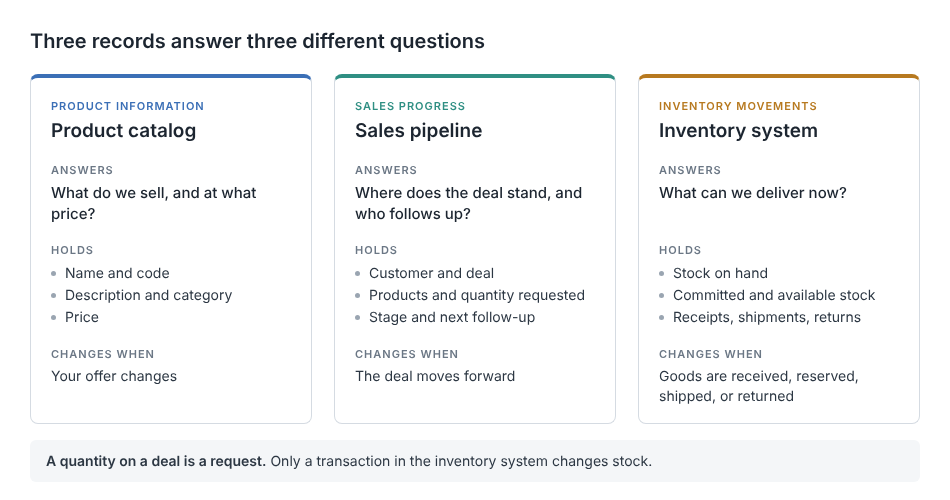
Figure 1. A product catalog, a sales pipeline, and an inventory system each answer a different question.
A product catalog and sales pipeline can be enough when stock control happens elsewhere
A product catalog and a sales pipeline are enough in two situations. The first is when you have no physical stock to track, because you sell services or make each order after the customer places it. The second is when you already track stock in another system, such as an inventory application or your accounting software.
In both situations, the CRM handles the selling: a salesperson selects the products for a deal, records what was discussed, schedules the next follow-up, and advances the deal through stages.
Being small does not remove the need for stock tracking. A team with a short product list still needs it if two people can sell the same units to different customers without knowing it.
If delivery depends on physical stock, the salesperson needs to know how many units are available now, how many are already committed to other orders, and when the next delivery from the supplier is due. Make sure the salesperson can look up those numbers in the system that tracks your stock or ask a specific person who can, because otherwise the delivery date on the deal is only a guess.
Real inventory control requires more than a quantity field
You need a dedicated inventory system when you have to trust the stock count without checking the shelf, and you can only trust the count if the system records everything that changes it. Every delivery, shipment, and correction should be recorded, and purchase orders should show what is on its way. The system should reserve units for confirmed orders and either return them to stock or write them off. If you keep stock in more than one place, you need a separate count for each location and a way to record transfers between them. For replenishment, look for reorder points, which alert you when an item's count drops below a set level.
Inventory tracking is different from demand forecasting. A report of past sales shows what has already happened, while a forecast uses that history to estimate future demand and suggest how much to order. A reorder point does neither, because it is a fixed level that you set yourself.
Zoho Inventory is one example of a dedicated inventory product. Its pricing page lists a free plan that covers 50 orders per month, 1 user, and 1 location. If you handle more orders than that, you need to get the Standard plan, which costs $29 per organization per month billed annually, or $39 billed monthly, and covers 500 orders a month, three users, and two locations.
If you manufacture what you sell, you also need bills of materials, material planning, and production scheduling, which go beyond counting finished goods. Our guide to manufacturing software for small businesses explains those requirements.
Bigin connects products with deals and customer follow-up
Bigin's Products module is a product catalog, and it is included in every edition, starting with the Free edition.
You can add products to a deal, and for each product, Bigin's documentation lists the list price, a quantity, and a discount. A salesperson can then open the deal and see what the customer wants to buy, along with the calls, tasks, and notes for that customer.
Bigin's product catalog doesn't show how many units you have in stock. On its own, it also does not reserve units for an order, reduce a stock count when you make a sale, or prompt you to reorder.
Pipeline stages do not track stock either. A stage is a label that you define, so naming one "Order confirmed" or moving a deal to "Won" does not reserve stock or create an invoice or any other accounting transaction.
Tracking a quote in the pipeline is also different from producing the quote document: a stage can indicate that a quote has been sent or accepted, but the document itself comes from either a Zoho Writer merge template, (which Bigin documents for all editions) or from a connected accounting product.
For broader advice on choosing and using a CRM for sales, read our guide to sales CRM software for small business.
Accounting integrations need a defined role in the sales workflow
An accounting integration copies customer and product details between Bigin and your accounting software, but neither of the integrations below makes Bigin track stock. Both are available from Bigin's Express edition, which costs $7 per user per month billed annually, or $9 billed monthly.
The QuickBooks integration works with QuickBooks Online only.
Bigin's setup guide says the integration is "currently available only for QuickBooks Online." It describes a two-way sync in which customers in QuickBooks are matched with companies or contacts in Bigin, and items are matched with products.
From a deal in Bigin, a user can create a quote or invoice, and Bigin fills in the products already attached to that deal. The guide says this feature is available only to Bigin accounts hosted in the US, Canada, EU, and Australia data centers.
Stock is tracked in QuickBooks. For inventory tracking, you need to get the QuickBooks Online Plus plan or the Advanced plan. The Plus plan is listed at $140 per month with no annual contract, before any introductory discount.
During setup, the Quantity on Hand field in QuickBooks is mapped to a custom number field on Bigin products, so a product in Bigin can display that stock count. The guide does not say how often the number is updated, so I would confirm the stock in QuickBooks before promising it to a customer.
The Zoho Books integration creates estimates, sales orders, and invoices from a Bigin record
According to Bigin's help article, an administrator has to set up this integration. Companies and contacts in Bigin are then synced with customers in Zoho Books, and products are synced with items in Zoho Books. Zoho Books' guide says that after the first sync, records sync automatically every two hours.
Bigin's integration page calls the sync two-way, while the Zoho Books guide describes records moving from Bigin into Zoho Books, so confirm the direction during setup.
Users can create and view estimates, sales orders, and invoices from a customer or deal in Bigin, and those documents are synced with Zoho Books.
For stock tracking, sales orders, and purchase orders in Zoho Books, you need to get the Professional plan, which costs $40 per organization per month billed annually, or $50 per month. Neither guide says that the stock count from Zoho Books appears in Bigin, so you will need to check it there.
Zoho Inventory is a separate product, and Bigin's FAQ lists a Zapier integration.
Both integrations depend on the two systems recognizing the same product and the same customer, so give each product the same name and code in both systems. Our guide to CRM with invoicing explains what happens between winning a deal and getting paid.
Preventing overselling depends on stock checks and reservations
No CRM can prevent overselling by tracking deals, because overselling occurs when you promise units that are unavailable. Avoiding it requires an up-to-date stock count, reserving units for each confirmed order if your inventory system supports reservations, and clear rules for cancellations and returns. A canceled order should make its reserved units available again, and a returned item should be added back to stock or written off.
On every deal, keep the customer's request separate from your commitment. The quantity and delivery date the customer requests are a request, while the quantity you can supply and the date you can deliver are commitments that only the person or system managing your stock can confirm.
The salesperson should get that confirmation before replying to the customer, either by checking the available quantity in the inventory system or by asking a colleague. Asking a colleague is a manual step, so decide who answers these requests, and ask the salesperson to record the confirmed quantity and delivery date on the deal.
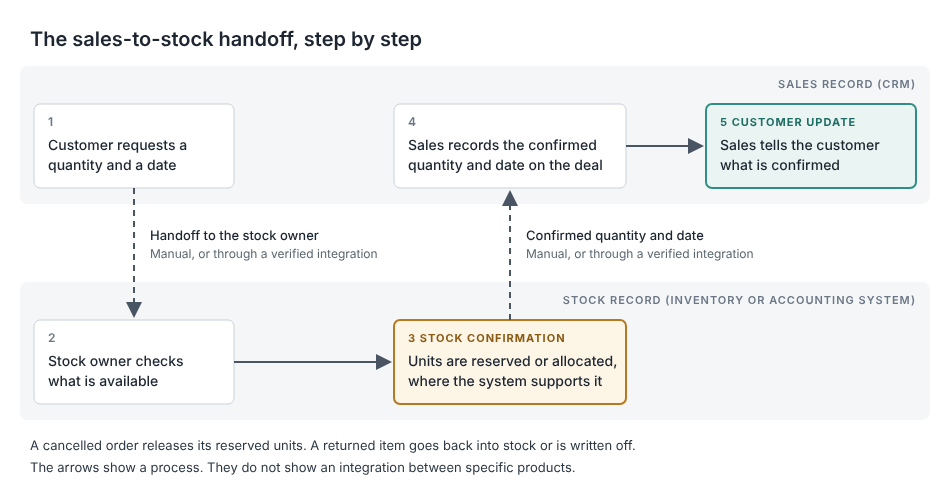
Figure 2. The salesperson confirms stock availability before providing the customer with a delivery date.
Reminders, pipeline views, and emails to customers help your team communicate, but none of them change how many units you have in stock, so they cannot stop you from selling more than you have in stock.
Compare the cost of the complete workflow
Bigin charges per user, while the accounting and inventory products in this guide charge per organization and limit the number of users, monthly orders, or locations per plan.
Work out the price of the plan that includes the features you need, because the cheapest plan a vendor advertises may not include them. Bigin's Free edition, for example, does not include the accounting integrations.
Check whether a free offer is a permanent free plan or a trial that ends. Bigin's Free edition, which covers one user and 500 records, does not expire, and Zoho describes its free Zoho Inventory plan as "forever-free." Bigin's trial for its paid editions lasts 15 days, and the introductory discount is temporary, so compare regular list prices.
Compare the cost of handling an order from start to finish, including any manual work the software leaves to your team, such as retyping orders into a second system or answering stock-related questions.
Choose Bigin when the missing piece is customer and sales management
If your main problem is knowing what is in stock, what to purchase, or when to reorder, start with an inventory system or an accounting plan that includes stock tracking.
If your main problem is keeping products, deals, customer conversations, and follow-ups in one place, Bigin may be a good fit. It works alongside the system that tracks your stock and does not replace it.
Before you pay, check three things: which system holds the official stock count, exactly which plans your workflow requires, and how one real order passes from the salesperson to the person who manages stock and back to the customer.
If sales and customer follow-up are what you need to fix, you can compare Bigin's editions and prices, which include a Free edition for one user.