- Tamanna Kovoor
- Published: 01/22/2026
- Last Updated: 08/17/2026
Most small businesses I speak to say they lack pipeline visibility, yet already own a CRM. The deals are in there. Somebody drags cards left to right most weeks. And when the owner asks what is really closing this month, the answer is still a guess with a dollar sign in front of it.
A pipeline view tells you deals exist. It does not tell you whether they are real, whether anyone has touched them in three weeks, or whether the total at the bottom of the board means anything. Closing that gap is what a sales deal management system is designed to do. Most of the work is not software.
What a sales deal management system is
A sales deal management system is the deal record plus the rules you put around it. The record holds the value, the stage, the owner, the expected close date, the next step, and the full history of calls, emails, and meetings for that opportunity. The rules determine what must be true before that deal moves forward.
The software half is easy. Every CRM in this article gives you a drag-and-drop board within 10 minutes of signing up. The half that produces control is the set of rules, and almost no tool sets those up for you. That is why two businesses can use the same CRM and get completely different results.
Deal management and pipeline management are not the same job
The distinction sounds academic until you try to fix a bad forecast, at which point it becomes the only thing that matters.
Pipeline management is the wide view. How much is open, how fast it moves, and whether you have enough of it to hit the number. It answers the question: Do we have enough deals?
Deal management is the close view. One opportunity at a time. Who owns it, what happened last, what has to happen next, and whether the buyer has actually committed to anything. It answers a harder question: are these deals real?
You need both, and the second one feeds the first. A pipeline report built on deals nobody has inspected is just a spreadsheet of hopes. Pipeline control is what you get when every deal in the wide view has survived the close view.
Why the default CRM pipeline works against you
Here is something worth checking in your own account today. Open your deal stages and read the names out loud.
HubSpot's default deal pipeline ships with seven stages and a win probability attached to each: Appointment scheduled at 20%, Qualified to buy at 40%, Presentation scheduled at 60%, Decision maker bought in at 80%, Contract sent at 90%, then Closed won and Closed lost. It is a reasonable starting point and easy to leave alone.
Look at what three of those stages measure. "Appointment scheduled" is a calendar entry. "Presentation scheduled" is another calendar entry that lets you book 60% of a deal's value before you have presented anything. Those stages describe what your rep did, not what the buyer decided. A prospect who takes a meeting out of politeness sits at the same 60% as one who has told you they have a budget.
Do that across 20 deals, and your board reports $200,000 while your quarter closes at $80,000. Nobody lied. The stages were just measuring the wrong thing.
Stage names should describe a commitment the buyer made. "Discovery done" becomes "Problem confirmed and budget range known." "Presentation scheduled" becomes "Solution reviewed with the person who signs." Renaming costs you an afternoon and is the single highest-return change most small teams can make to their pipeline.
Five rules that turn a deal list into a controlled pipeline
None of these requires an expensive plan. Four of the five work with a free CRM or a spreadsheet if you are not ready to move yet.
Write one line of exit criteria per stage.
For every stage, write the one thing that must be true for a deal to leave it. Not a paragraph. One line, in plain language, that two people would agree on.
A working example for a five-stage pipeline: leaves Qualified when the buyer has named a problem and a rough budget. Leaves Discovery when you know who signs and their timeline. Leave a proposal when the proposal has reached the person who signs, not just your contact. Leaves Negotiation when terms are agreed verbally, and only paperwork remains. Then, won or Lost.
Write these down where the team can see them. Half the value is in the argument you have while writing them, because that is usually the first time everyone discovers they were using the same stage names to mean different things.
Put a date next to the next step on every open deal.
This is the field that does the most work and gets skipped the most often. Every open deal needs a specific action and a date. "Follow up" is not the next step. "Call Priya on Thursday to confirm the security review is scheduled."
A deal with no next step is not a deal. It is a memory. Sort your board by next-step date once a week, and you will find deals nobody has thought about since a demo in March.
Set a staleness threshold and enforce it.
Deals go quiet before they die, and the quiet period is where you can still save them. Most teams notice too late because they have no number for "too long."
Here is a rule of thumb you can derive from your own data instead of borrowing someone else's. Take your median sales cycle, divide it by your number of stages, then double it. If your typical deal closes in 40 days across five stages, that is 8 days per stage, so anything left untouched for 16 days gets flagged. Pipedrive calls this deal rotting and does it for you. In any other tool, a saved view filtered on the last activity date does the same job for free.
The flag only matters if something happens when it fires. Either the rep gets in touch, or the deal moves to a lost stage with a reason. Deals do not get to sit in limbo because nobody wants to admit they are gone.
One owner, one close date, and a count of how often it moved
Shared ownership means no ownership. Every deal gets one name on it, even if three people are working it.
The close date is more interesting than it looks. Track how many times it changes. A deal whose close date has slipped three times is telling you something a stage never will, and it is usually that the buyer has no real deadline. Most CRMs will not count this for you, so a simple number field that reps bump manually is enough.
Record a lost reason that is not "price"
"Price" is what buyers say. It is rarely the reason. Give your team a short list of real options: no budget confirmed, went with a competitor, no decision made, wrong fit, went quiet. Five options, one of which is mandatory before a deal can be marked lost.
After 20 or 30 losses, you will have your first genuine piece of sales intelligence, and it usually contradicts what everyone believed. When "no decision made" is the top reason, you do not have a pricing problem; you have a qualification problem.
How many stages does a small business need?
Five, if your sales cycle is under a month. Six or seven if you sell something that takes a quarter to close and involves a security review or a procurement team.
The mistake is adding stages to capture nuance. Every extra stage is another decision your reps have to make correctly and another place a deal can hide. If you find yourself wanting a stage for "sent the case study," that is a field or a task, not a stage. Stages are for buyer commitments. Everything else is activity.
One more thing that catches people out: put a Lost stage in from day one, and make it reachable from every other stage. Teams that only allow deals to exit at the end up with a pipeline full of zombies, which is precisely what you bought the system to prevent.
The two numbers that keep a forecast honest
Once your stages mean something, two calculations do most of the forecasting work for a small team. Neither needs AI.
Weighted pipeline
Multiply each open deal by its stage probability and add them up. Say you have three deals open:
- $80,000 in Discovery at 20% weight, which is $16,000
- $40,000 in Proposal at 50% weight, which is $20,000
- $25,000 in Negotiation at 75% weight, which is $18,750
Your board shows $145,000 open. Your weighted pipeline is $54,750. That second number is the one to plan hiring and cash flow around, and the distance between the two is a useful measure of how much wishful thinking is in the room.
A weighted pipeline is an aggregate metric. It works across a lot of deals and lies to you about any one of them. No individual deal closes at 50%; it closes, or it does not. So use stage probability for the roll-up, and use a separate judgment call for each big deal: commit, best case, or unlikely. Small teams that keep those two things apart forecast far better than teams that try to make one number do both jobs.
Pipeline coverage
Pipeline coverage is calculated using open pipeline (deals not in closed lost) divided by target, and the ratio you need comes straight from your win rate. If you win one deal in four, you need 4x coverage. If you win one in three, 3x is enough.
Say your quarterly target is $60,000 and you close 25% of qualified deals. You need roughly $240,000 of open pipeline to be confident. If you are sitting at $150,000 in week two, no amount of pipeline hygiene fixes that. You have a prospecting problem, and the coverage number told you six weeks before the forecast would have.
Most small teams have never calculated their own win rate. It takes 10 minutes with your closed deals from last year, and it makes every other number more useful.
Choosing a system: what to check before you commit
Feature lists are nearly useless at this end of the market because every tool has the same list. Five things matter three months in, and only one of them appears on a comparison page.
Start with how many pipelines you get and what they cost. The moment you sell two different things, or you want a board for post-sale onboarding, you need a second pipeline. In my experience, this is the ceiling small teams hit first, and it is the one vendors advertise least.
Then ask whether the software can make a field mandatory before a deal advances. That is stage-gating, and it separates a process you hope people follow from one that the system enforces. It sits at a different price in each tool, as shown in the table below.
Test the mobile app properly, not by looking at screenshots. Can a rep update a deal from a phone in under 30 seconds? If not, your data will be bad, because updates happen in a car park between meetings, or they do not happen at all.
Price it based on your actual headcount and watch for seat minimums. A $12 seat price with a three-seat minimum comes to $36, whether you have three people or one.
Finally, check that you can get your data out before you put any in, and check the migration path in. Bigin, for example, supports one-click migration from Pipedrive, HubSpot, Insightly, and Zoho CRM. That matters more than it sounds if you have two years of history stored elsewhere.
What the free plans give you
This is where most comparison articles go vague, so here are the real numbers, checked against each vendor's own pricing and documentation pages.
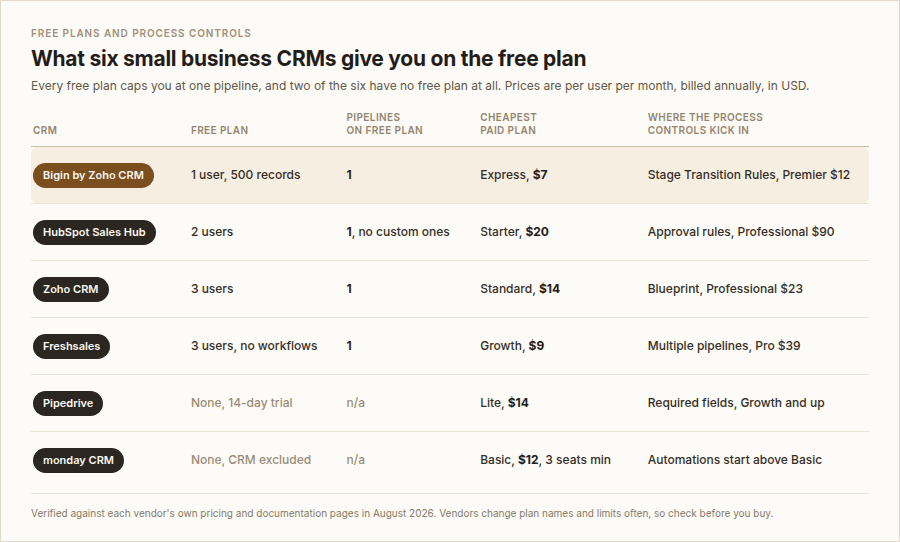
Free plan limits and entry pricing across six small business CRMs (as of August 2026)
A few things are worth saying out loud about the table above.
The one-pipeline ceiling is universal. Not one free plan here lets you run a second pipeline, and HubSpot's free tier will not let you create a custom pipeline at all. If you sell two things with genuinely different steps, a free plan will fail you early, and the workaround people reach for, which is jamming both processes into one set of stages, is exactly what makes a pipeline unreadable.
Two of the six have no free plan. monday's free plan exists but excludes the CRM product, which is easy to miss on the pricing page. Combined with the three-seat minimum, a solo operator evaluating monday CRM is looking at $36 a month, not $12.
Process enforcement is the expensive part everywhere. Zoho CRM's Blueprint, which stops a rep from skipping a stage or leaving a mandatory field blank, is available for Professional at $23. HubSpot's approval-based pipeline rules need a Professional subscription at $90 per seat. Bigin's Stage Transition Rules need Premier at $12. Pipedrive's required fields, which you can scope to specific pipelines and stages, start at Growth. If an enforced process is what you came for, price the tier that has it, not the headline tier.
And Salesforce, which shows up in every roundup on this topic, starts at $25 per user per month for Starter Suite. It is a fine product. For a team of four running a 40-day sales cycle, it is an answer to a question you have not asked yet.
An afternoon of setup that will hold for a year
You do not need a project plan. You need about three hours.
- Write your five stages on paper first, each named after a buyer commitment. Do this before you open any software, or the software's defaults will decide for you.
- Write the one-line exit criteria under each stage. Argue about them now rather than in a forecast meeting in November.
- Build the pipeline in your CRM and delete every default stage you are not using. Leftover stages get used.
- Add three fields if they are not already there: next step, next step date, and lost reason. Make lost reason a dropdown with five options.
- Import your live deals only. Not your contact history, not the deals from 2024: live deals, each with an owner and a close date. If a deal cannot get to the next step, it is not live, and importing it just recreates the mess you are trying to escape.
- Build one saved view: open deals with no activity in the last 14 days, sorted oldest first. That view is your weekly meeting.
Step five is the one people skip and regret. A clean pipeline with 12 real deals beats a comprehensive one with 90 records nobody trusts.
The weekly review that makes the whole thing work
A deal management system decays without a meeting attached. Half an hour a week is enough for a small team, and it should not be a status roundtable where everyone reads out their deals.
Open the stale view first. For each deal on it, one question: what is the next step and when? If there is no answer, it moves to the lost status. Being ruthless here in the first month is uncomfortable, and it is the reason the system works in the third month.
Then look at the top three deals by value regardless of stage. For each one, ask what would have to go wrong for this to slip, and what evidence you have that the buyer is committed rather than interested. If the only evidence is that they seem enthusiastic, the deal is not where the board says it is.
Finish with coverage. Open a pipeline against the target, using your own win rate. If coverage is short, the meeting ends with prospecting actions rather than pipeline actions. No amount of deal management can manufacture deals that were never created.
Where Bigin fits, and where it does not
Bigin is Zoho's pipeline-first CRM for small businesses, and on the specific job this article describes, it is a reasonable fit, so it is worth being precise about what you get at each price rather than waving at it.
The free plan includes 1 user, 1 pipeline, 500 records, and 3 automations. That is genuinely useful for a solo operator, and it is enough to run the five rules above. It is not enough for a team, and it does not include email integration, so calls and meetings log cleanly, but your email thread does not.
Express at $7 per user per month is where it becomes a team tool: three pipelines, 50,000 records, 30 automations, and two-way email and WhatsApp. For most small businesses, that is the plan.
Premier at $12 adds the feature that maps to pipeline control. Stage Transition Rules let you set checkpoints so a deal cannot move to the next stage until the conditions you defined are met. That is your exit criteria enforced by the software, rather than by nagging. It also adds five pipelines, advanced automation, and duplicate cleanup.
Where it is not the right answer: if you need heavy custom reporting, complex territory rules, or you are already past 20 people, you will hit the ceiling, and the honest path is Zoho CRM proper rather than stretching Bigin. Zoho publishes a one-click migration for exactly that reason, which is a point in its favor, but it is still a migration.
The reason Bigin suits this particular problem is that it was built around pipelines rather than having pipelines added to it, and the setup takes minutes rather than days. For a small business, a poorly used CRM is worth more than a powerful one that gets abandoned.
FAQs
What is a sales deal management system?
It is the deal record plus the rules around it. The record holds the value, stage, owner, close date, next step, and full activity history for one opportunity. The rules define what must be true before the deal moves to the next stage. Most CRMs give you the record for free; you supply the rules.
Is a sales deal management system the same as a CRM?
Not quite. A CRM is the wider system of record for contacts, companies, and history. Deal management is the part of it concerned with opportunities and how they progress. Every CRM in this article includes deal management, but a CRM can also hold customers you are not currently selling to, which a pure deal tool would not.
What is the difference between pipeline management and deal management?
Pipeline management is the aggregate view: how much is open, how fast it moves, and whether coverage is sufficient. Deal management is the individual view: whether one specific opportunity is real and what happens next. Pipeline management tells you if you have enough deals. Deal management tells you if those deals are worth counting.
How many stages should a small business's sales pipeline have?
Five for cycles under a month, six or seven for longer or more complex sales. Name them after buyer commitments rather than your own activities, and include a Lost stage reachable from anywhere. More stages mean more places for deals to hide.
Can you run a deal management system on a free CRM plan?
Yes, with one significant limit. Every free plan in this comparison caps you at a single pipeline, and HubSpot's free tier will not let you create a custom one. Exit criteria, next steps, staleness flags, single ownership, and lost reasons all work on a free plan. Enforced stage gating and multiple pipelines are the two things you will pay for.
How do you calculate pipeline coverage?
Divide the open pipeline value by your target for the period. The ratio you need is 1 divided by your win rate: a 25% win rate needs 4x coverage; a 33% win rate needs 3x coverage. Calculating your own win rate from last year's closed deals takes about 10 minutes and makes the number meaningful rather than borrowed.
When should a deal be flagged as stalled?
Take your median sales cycle, divide by your number of stages, then double it. A 40-day cycle across five stages gives a 16-day threshold. Pipedrive automates this as "deal rotting"; in any other tool, a saved view filtered by last activity date does the same thing at no cost.
What is stage gating, and does a small team need it?
Stage gating stops a deal from advancing until required fields or conditions are met. Bigin calls it Stage Transition Rules, Zoho CRM calls it Blueprint, and Pipedrive handles it by scoping required fields to stages. A team of two or three can usually run on discipline alone. Once four or more people are updating the same board, enforcement stops being optional, because one person's shortcuts become everyone's bad data.
What is the difference between stage probability and forecast category?
Stage probability is a fixed percentage assigned to each stage, used to weight the pipeline as a whole. Forecast category is a judgment call on one deal, usually commit, best case, or unlikely. Probability works in aggregate and is meaningless for any single deal. Use both and keep them separate.
How long does it take to set up?
About three hours for the pipeline design, fields, and a clean import of live deals, if you have written your stages and exit criteria first. Migrating years of historical data takes longer, but you rarely need it on day one, and starting with live deals only produces a system people trust faster.
----
Article updated in August 2026. Editor: Anubhav Sarker