- Anubhav Sarker
- Published: 09/25/2026
- Last Updated: 11/19/2026
Business management software organizes the records and work needed to run a business
Small business management software is any application that a small business uses to keep its records and coordinate its work. "Business management software" is an umbrella term for the applications that manage customer relationships, finances, projects, inventory, and daily operations. You will also see it called small business software or a small business management system.
The term can describe either a focused application, such as an accounting program, or a broader suite that offers several applications under a single subscription. It does not guarantee that every function is included. Vendors of customer databases, task boards, and employee scheduling tools all use the label, and they use it correctly.
The label tells you very little, so look at what a product does with information. Every product in this category stores records, shows who is responsible for each one, and helps work move from one person to the next. A record is a saved entry about one thing, such as a customer, an invoice, or a task.
In many small businesses, one person takes the customer's request, another delivers the work, and a third sends the invoice. Each of them needs the same facts: what was promised, to whom, and by when. The software carries those facts across each handoff, so that nobody has to ask again.
Accounting software, project tools, and CRMs manage different parts of the business
Accounting software manages financial transactions and the records built from them, such as invoices, bills, payments, and expenses. Project management software organizes delivery work: the tasks, the person responsible for each one, the deadlines, and the dependencies, where one task cannot start until another is finished.
CRM software, short for customer relationship management, manages customer records, sales activity such as calls and deals, and the follow-up each customer is waiting for. Inventory software manages stock and the transactions that change it, including receipts, shipments, returns, and adjustments.
A broader suite combines several of these functions, and its coverage varies by product and by plan.
All of these categories sit inside business management software. A CRM is one kind, and an accounting program is another. Anyone weighing "a CRM or business management software" is comparing one category with a product that covers several.
Business function | Software category | Capability to check |
|---|---|---|
Recording income, bills, and payments | Accounting software | Can it create invoices and record payments? |
Delivering work by a deadline | Project management software | Can tasks depend on one another and show who is responsible? |
Winning and keeping customers | CRM software | Does each customer record show past contact and the next follow-up? |
Knowing what is in stock | Inventory software | Do sales, receipts, and returns change the stock count? |
Several of these at once | Broader suite | Which functions does your plan include, and do they share customer records? |
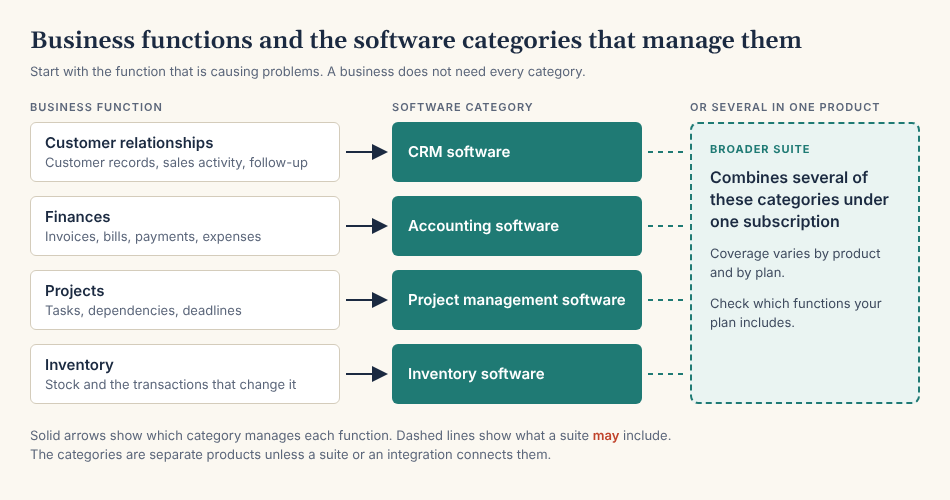
Figure 1. Each function points to one category, and a suite may combine several
Mistaken purchases happen at the boundaries between categories. A product catalog lists what you sell and what it costs. It does not track stock unless the software also records the transactions that change the count, as our guide to inventory and sales software for small businesses explains. A follow-up task that reminds one person to contact one customer is far short of project management across a team. An accounting integration passes records between a CRM and a separate accounting product, and the accounting still happens in that product.
Small businesses need stronger systems when information and responsibility become difficult to track
Spreadsheets and a shared inbox can support a small business for years when the process is limited and well managed: one person keeps the file current, and the volume is low enough to review by eye. Google Sheets can even automate repetitive tasks with macros. Paid software is not always the better choice.
I would not set a threshold by revenue, headcount, or transaction count, because none of those numbers tells you whether your process works.
Duplicate records are often the first sign that it has stopped working: the same customer appears in two files with two phone numbers, and nobody knows which is current. Related signs are inconsistent information, such as a quoted price that differs from the invoiced price, and repeated entry, where someone types the same customer details into a quote and again into an invoice.
The other signs concern responsibility. A job is sold, and the person who schedules it hears about it late. A message sits unanswered in a shared inbox because each person assumes someone else has replied. A simple question about last month's sales takes an afternoon of copying figures between files.
Software cannot make up for an undefined process. If nobody has decided who answers new inquiries or who approves a discount, a new system will record the same confusion in a tidier format. Decide the process and name the responsible person first.
Day-to-day use connects records, responsibilities, and the next action
People record information when it arrives, such as a new inquiry or a payment, and assign each open item to one named person. They update progress as the work moves and look up context, such as the last conversation with a customer, before they act. Then they act on what is outstanding: the calls due today and the overdue invoices.
Recording an action is different from carrying it out. When a salesperson changes a deal's status to "won," the software records a decision. That status change does not create an invoice, reserve inventory, or start a project unless the system supports that behavior and someone has configured it.
Customer-facing work and operational work meet where a request becomes a promise. A salesperson records what the customer asked for, such as a quantity or a start date. Whether the business can deliver it is a fact known to the people who do the work, as reflected in a schedule or a stock record. That team must confirm the request before anyone presents it to the customer as a commitment. Software can route the question and store the answer, but a person still has to check the schedule or the shelf.
The most useful features make ownership, access, and follow-through clear
Feature lists look alike across products, so I judge each feature by the requirement behind it.
Record organization and search come first: you should find a customer by name or phone number within seconds and see everything linked to that customer. Every record and task also needs one named owner, and the software should list the items that have none.
Permissions control who can view, edit, export, or delete each kind of record. A bookkeeper and a contractor need different access, so check that your intended plan lets you set it.
Tasks and reminders turn a promise into a dated item on one person's list. Reports answer questions about many records, and an activity history shows who changed one record and when.
Imports bring your data in, and exports let you take it out again. Test both, because a product that is hard to export from is costly to leave.
An integration is a connection that passes data between two products. Ask which records move, in which direction, and how often. Automation runs a step without a person. Each automated rule needs a trigger, meaning the event that starts it, exceptions for the cases it should skip, and a stopping condition, so that a payment reminder stops when the customer pays.
Mobile access matters only when work happens away from a desk.
Vendors use the word "feature" for different things. A native function is built in. A configured workflow is something you must set up with the product's own tools. An integration depends on a second product, which may need its own subscription.
Shared software does not make every record accurate or visible to everyone. People still enter the data, and permissions may hide a record from the person who needs it.
One system can cover several functions without covering the whole business
Can one software system run an entire small business? It can when the business has simple needs. More often, a single system covers several functions, while the rest remain in separate products.
A broader suite gives you one vendor, one bill, and customer data that its applications may share. In exchange, each function may do less than a specialist product, require more setup, and the function you need may be available on a higher plan. Separate tools give you more depth in each function, but you have to manage permissions in each product, pay several bills, and maintain integrations between them.
Do not assume that every application in a suite shares every record, or that the bundle includes the highest tier of each application.
Either way, decide which system owns each important record. Owning a record means that people create and correct it there, and the other systems receive a copy. The billing address might belong to the accounting system, the open deal to the CRM, and the stock count to the inventory system. Then write down how an update travels between systems: through an integration, on a schedule, or by a person retyping it.
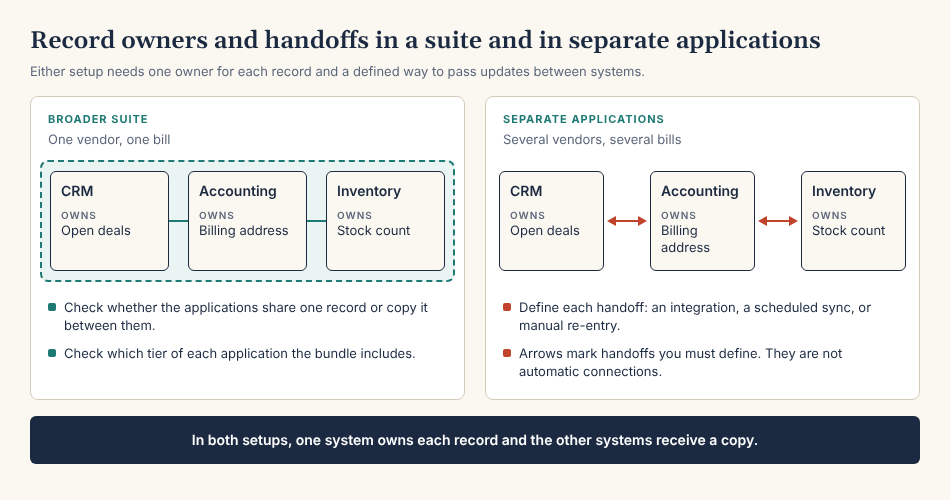
Figure 2. Each record needs one owning system, and each handoff needs a defined method.
Specialized requirements can settle the choice at any size. A manufacturer that plans production from bills of materials, which list the parts in one unit, needs manufacturing software built for that work, and a retailer with stock in several locations needs dedicated inventory software. Many manufacturers, retailers, and service businesses have simpler needs, so check the requirement before you rely on an industry label.
The cost depends on users, capabilities, and the systems you need to connect
I have left prices out of this guide because a price means little until you know the plan and the number of users.
Some vendors charge per user each month, so the cost rises with headcount. Others charge a single subscription for the entire organization, often with a cap on users. Many plans limit the number of records or contacts, and exceeding the limit moves you to a higher plan or a paid add-on. The function you need may be sold as a separate module.
Then count the costs that a pricing page may not show: onboarding help, the work of migrating your data, a connector subscription or a developer for integrations, and the hours someone spends on administration every month.
Keep permanent free plans and temporary trials apart. A permanent free plan has no end date, but it limits users, records, or features. A trial gives you a paid plan for a fixed number of days. Vendors differ on whether they offer either one, so check each vendor's pricing page.
Before you accept an annual commitment, verify the renewal terms and the limit that would force an upgrade. Read the refund policy as well, because canceling partway through a paid year does not automatically produce a refund.
For current products and prices, see our comparison of small business management software.
A CRM fits when customer relationships and follow-up are the main work you need to improve
A CRM-centered tool is enough when the work you need to fix is customer-facing: inquiries that wait too long for an answer, quotes that nobody follows up, and customer history scattered across inboxes. If your accounting already works, a CRM may be the only new purchase you need, and our guide to sales CRM software for small business explains how to choose one.
A CRM is not enough when the problem sits in the ledger, in a project schedule with dependencies, or in a stock count. Those problems still need accounting, project, or inventory software. If several functions are failing at once, a broader suite is the better place to start.
Bigin is our CRM for small businesses and small teams. It keeps contacts and companies as records and tracks deals through pipelines. A Team Pipeline holds one team's process, such as sales, onboarding, or support. The Free plan includes a single pipeline. For three Team Pipelines, you need the Bigin Express plan.
Follow-up runs on activities: tasks, events, and calls linked to a record. Task reminders are included in every plan. Workflow rules can update a field or assign an owner when a record is created or changed. For more than 3 automation rules, you need Bigin's Express plan, which allows 30. For stage transition rules, which make users complete required fields before a deal moves to another stage, you need to get Bigin's Premier plan. Our feature availability page lists every limit by plan.
Bigin does not replace accounting, inventory, or project software. It does not track stock levels, warehouses, or purchase orders, and a task in Bigin is either open or completed. Bigin connects to Zoho Books and QuickBooks Online through integrations. For either one, you need to get Bigin's Express plan, and each accounting product has its own plans.
If customer follow-up is the work you need to improve, you can try Bigin free for 15 days without a credit card.
-
This article was developed with the assistance of AI tools, including ChatGPT and Claude, for research, fact-checking, cross-referencing, and drafting. While we have made every reasonable effort to verify the accuracy and reliability of the information presented, we encourage readers to independently verify any information before relying on it for personal, professional, commercial, or other purposes.