Turn Facebook
Lead Ads into deals
with Bigin
Every form someone fills on your Facebook ad lands in Bigin the moment they hit submit, through a native integration built by Zoho.
No spreadsheets, no paid connectors.
Getting leads from Facebook but
losing them after?
Get better ROI on your social media ads and fine-tune your ad strategy by automatically capturing leads from Facebook ads in Bigin, through a native integration built by Zoho.
Here’s how Bigin closes that gap.
Capture Facebook leads.
Close more deals.
LeadChain connects your Facebook ads to Bigin and captures every lead automatically,
so you can follow up fast, close sooner, and see which campaigns actually work.
- Capture leads
- Easy conversion
- Ad optimization
Every Facebook lead in Bigin, in real time
Pick your Facebook page and lead form, map the fields once, and LeadChain handles the rest.
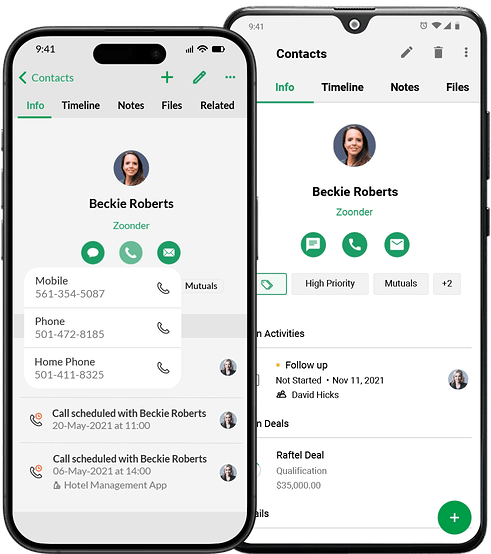
New leads show up as contacts in Bigin, tagged with the ad they came from.
Reach out while they still remember your ad
Facebook leads go cold fast. Set up a workflow that assigns each new lead to a rep, creates a call task,
and sends a welcome email automatically, so your team spends its time talking to leads, not sorting them.
Know which ads bring in buyers
Filter contacts by tag or lead source to see how many leads, and how many customers,
each Facebook campaign brings in.
Then put more budget behind the ads that actually sell.
Facebook leads, converted. See how it works!
Connect your Facebook adsImpressed already?
Bigin brings a lot more to the table.
Use pipelines to streamline and monitor sales, customer support, marketing, and a variety of other business operations.
- Multiple pipelines
Use pipelines to streamline and monitor sales, customer support, marketing, and a variety of other business operations.
- 360° view of contacts
Organize and access all the details you need about your customers and leads—from contact information and unique requirements to upcoming meetings and any other important notes.
- Multi-channel communication
Engage with your customers and leads through phone calls, email, WhatsApp, SMS, and social media without ever leaving Bigin.
- Task management
Schedule, reschedule, track, and get timely reminders for all your follow-ups, meetings, calls, events, and tasks so nothing slips through the cracks.
- Analytics
Monitor key metrics, track progress toward your goals, and keep an eye on your business health with Bigin's automatically generated dashboards.
- Mobile apps
Close deals, complete follow-ups, manage customers, and run your business from anywhere with Bigin's iOS, iPadOS, macOS, and Android apps.
- Seamless integrations
Connect Bigin with your favorite Zoho and non-Zoho apps so you can handle everything from marketing to accounting in one place.
And it integrates with other social media platforms too!
- Google Ads
- TikTok
- Click-to-WhatsApp ads
The affordable, feature-rich CRM!
Forever free, with
affordable paid plansCustomizable to
the smallest detailEasy to set up,
easier to usePrivacy-first with
top-notch data security
Trusted by 30,000+ small businesses globally
Bigin helped us streamline our lead management process, especially from online inquiries coming through social media and our dedicated telecalling team. With a well-structured pipeline and smart automation features, we’re now able to track every customer journey—from the first inquiry to final conversion—without missing a single opportunity. It has brought clear visibility to our sales team’s performance and has made it easier for us to plan timely follow-ups, understand hot leads, and take action faster.
We were particularly impressed by two key elements. First, the seamless integration of social media platforms. This feature alone revolutionized our lead management. Second, the support provided during our migration was exceptional. The team understood our operational nuances and guided us through the customization process effortlessly. Bigin is far more than just a place to store contacts; it’s a strategic growth partner.
Bigin has streamlined how I manage customer interactions, track leads, and follow up on opportunities. It’s given me a clear overview of my business operations and helped me stay organised and proactive. The mobile app is also a huge plus, allowing me to stay connected and responsive even when I’m out in the field. It’s not just software, it’s a strategic asset that empowers me to deliver better service, faster results, and long-term value to my clients.
Still have questions?
The answers to some FAQs might help.
- Setup
- Lead Management
- Benefits
Install the LeadChain topping from the Bigin Marketplace, create a new chain with Facebook Lead Ads as the source, choose your ad account, page, and lead form, map the fields, and publish. Head to this help document for more information.
No, LeadChain is built by Zoho and works inside Bigin, so there's no third-party tool to pay for or maintain.
Yes, LeadChain supports unlimited chains and ad accounts, so you can set up a separate chain for each page, form, or client.
Yes, you can match each question on your Facebook instant form to any standard or custom field in Bigin, or set a default value like lead source.
In real time. As soon as someone submits your Facebook lead form, they're added as a contact in Bigin.
Yes, add a tag or a default lead source while setting up the chain, and every synced lead is labeled automatically.
Yes, use Bigin workflows to assign owners, create follow-up tasks, and send emails as soon as a Facebook lead arrives.
Yes, enroll them in Bigin Sequences to send a series of timed follow-up emails, and move them through your pipeline once they're ready to talk.
The Conversions API lets you send sales events from your CRM to Meta. LeadChain uses it to share deal progress from Bigin, so Meta can optimize your ads for people who actually become customers.
LeadChain has its own subscription. The free plan includes 50 lead syncs a month, and the Standard plan, which adds the Conversions API and Custom Audiences, starts at $5 a month for 500 syncs.
Your ads bring the leads.
Bigin helps you close them.
- Overview
- LeadChain for Bigin
- Feature highlights
- Why bigin
- Testimonials
- FAQs