- Features
- Email-in
Direct your team emails to your
team pipelines
How many email aliases do you manage for your business? When there are multiple aliases for all your teams, organizing the emails received by each team into your CRM can be chaotic and exhausting!
Introducing our new topping Email-in - the emails received in your individual email aliases automatically get converted into records in the relevant team pipeline in your Bigin account.
Sign Up For FreeHere's how we can help you
- No more wasting time and effort in transferring data from your inbox to Bigin.
- Enjoy automatic conversion of your team emails into records in your team pipelines.
- Create distinct email aliases for records in multiple pipelines.
- Continue your email conversations from within your Bigin account.
- Take timely actions towards customer requests and queries.
- Zia Agent for automatically responding to incoming emails.
- AI-assisted email generation, proofreading, and translation.
Get a head start with Email-in
With Bigin's Email-in topping, the emails received to your individual team email aliases are automatically converted to records in the relevant team pipeline, ready for attention. It gives you a head start toward achieving a quicker turnaround for your customers:
- Emails from an existing contact are added as a new record associated with the contact.
- Any email received from someone who isn't already a contact automatically triggers the creation of a new contact record, with which future details will be associated.

Wondering how this works with Team Pipelines?
All you need to do is create a distinct email alias for each of your team pipelines. Whenever an email is received by a particular email alias, it's converted into a record in the relevant pipeline. You can also have these records automatically assigned to a team member who will be responsible for all related activities thereafter.

Keep the conversations going within your CRM
Once the email becomes a record in your team pipeline, you can view and reply to the email from the conversations tab inside your record. If there's an email thread, each message is added within the record in chronological order, thereby setting the context for further action.

Email-In,
enhanced by AI
Zia Agent: Reply Assistant
The Reply Assistant automatically responds to customer inquiries sent to your team IDs created via Email-In, without any intervention.

Disclaimer: Reply Assistant can be configured for emails sent to email IDs created through the Email-In feature.
Email Generation
Simply tell Zia the message you want to send and it will generate the email for you, including the subject!

Email Summary
Zia can summarize entire threads so you always know what's been said, what's been decided, and what needs your attention — without reading every message yourself.

Email Proofreading and Rephrasing
Zia can also proofread your responses and help you adjust the tone to fit any situation, whether you need to sound more professional, friendly, or concise. Your words, just polished.

Email Translation
Break language barriers and connect with customers from around the world in their preferred language with smart translations.
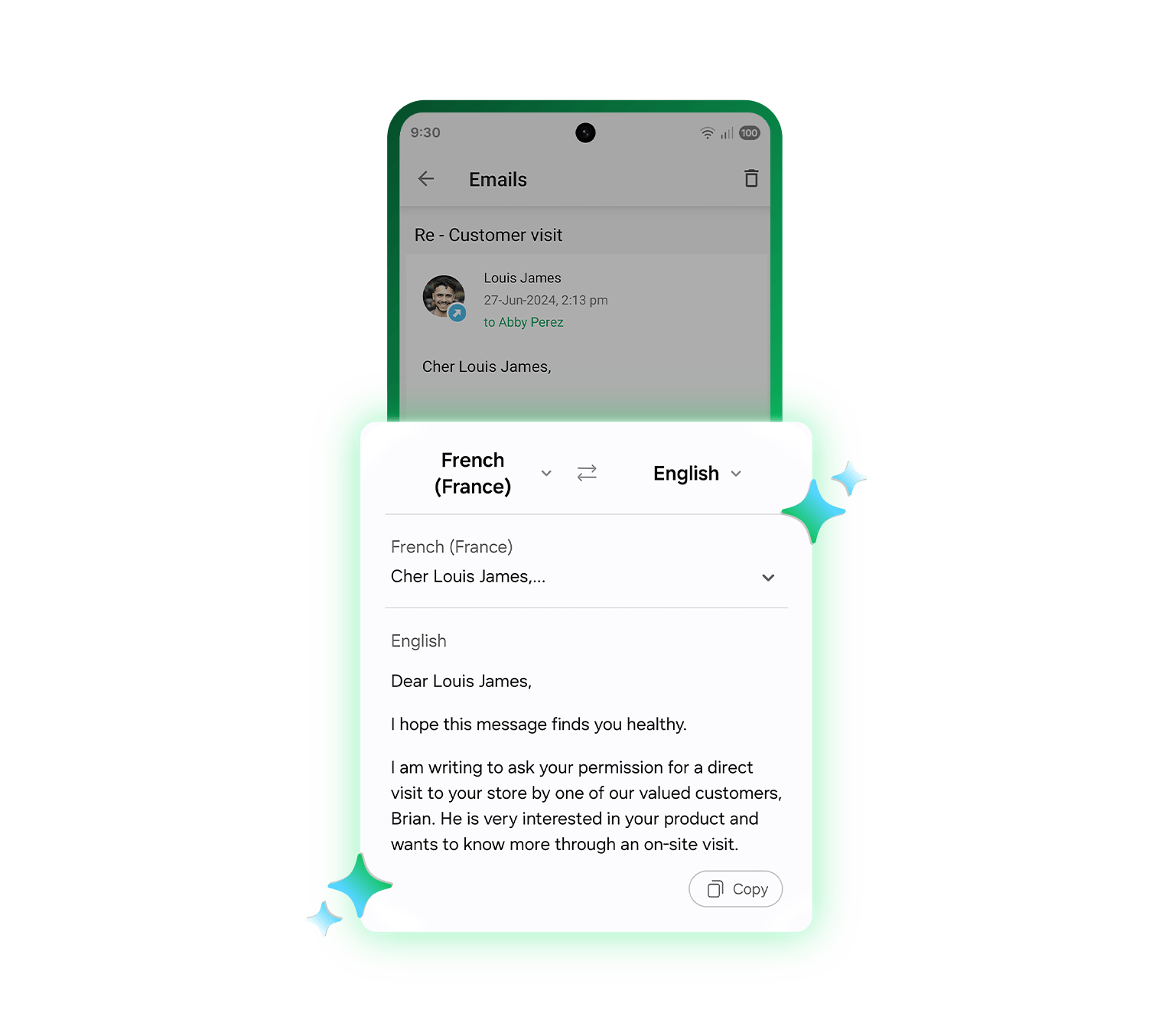
Disclaimer: Available on mobile devices that support Apple Intelligence or Galaxy AI.
Disclaimer: Available on mobile devices that support Apple Intelligence or Galaxy AI.
Tag your team members to the conversations
You can also add specific comments tagging your team members within the conversations tab.

Still have more doubts? Here are the answers to some frequently asked questions!
Email-in creates a dedicated email address for each of your pipelines. Any email sent to that address is automatically converted into a record in the relevant pipeline, so inquiries land in the right place without manual data entry.
Regular email is for one-to-one replies, while mass email reaches many contacts in a single send. You use mass email when the message is the same for a group.
You can add fields like a contact's name to make each message feel personal. This helps your send read less like a blast.
You can select a segment or filtered list, so the right people get the message. This keeps your sends relevant.
Send limits can depend on your plan to protect deliverability. The pricing page lists the current allowances.
Yes, you can track opens and clicks to see how your message landed. This helps you improve the next send.
Yes, templates let you reuse a design and message across sends. You adjust the content for each campaign.
Mass emails are sent to each contact individually, so addresses are not shared between recipients. This keeps your list private.
Yes. You can set a send time so the email goes out at your convenience. This helps you reach people at the right time.
Keeping your list clean and your content relevant helps deliverability. Following email best practices reduces the chance of landing in spam.
Not just tried and tested, but truly loved and attested.
This feature lets me know how engaged my email list is. Love it this is a must-have tool as it lets my team and I know what messages to tweak and what we've done right!
Seamlessly allows potential leads to request info and create opportunities without CRM data entry on my part.
Team emails simplified with Email-in!
Sign Up For FreeSee Our Pricing15-day free trial. No credit card required. No hidden charges.