Ease of use
Sign up for the free trial. If you can add a contact, create a deal, and log a follow-up in under 10 minutes without watching a tutorial, that's a green flag.
Most CRMs were built for enterprise sales operations. They assume you'll have a full-time admin, a dedicated revenue-ops manager, and weeks of onboarding. Small business owners don't have that setup.
What you get is software that asks for 40 fields before letting you save a contact, setup guides that run 60 pages, pricing tiers that hide the real cost behind a "contact sales" button, and features nobody on the team uses but everyone pays for.
A simple CRM cuts that back to the parts a small team uses every day: contacts, deals, follow-ups, and a clear view of what's next.
That's why we built Bigin to do the opposite of most CRMs: stay simple, stay affordable, and stay out of your way.
You might be ready for a simple CRM if any of these scenarios sound familiar:
Customer data lives in three places: your inbox, a spreadsheet, and your phone's notes app.
Follow-ups depend on memory, and the important ones keep slipping through the cracks.
Every new deal means rewriting the same notes in different places.
The team spreadsheet has grown to 28 tabs, and only one person knows where everything lives.
Quarterly check-ins with older customers haven't happened in months.
Onboarding a new salesperson takes a week because nothing is documented.
A simple CRM fits well for solo founders, sales teams under 20 people, consultants and freelancers, service businesses, real estate agents, marketing and design agencies, and small e-commerce operations.
One record per customer, with notes, emails, calls, and files attached to that record.
Every deal at every stage on one screen. Drag deals across stages as they move.
Set up a two-way sync with Gmail and Outlook; every customer email saves automatically to the right record.
Log calls, meetings, and tasks against each contact and deal.
The CRM nudges you when a deal goes quiet or a task is overdue.
Full pipeline, full contact records, full activity log on your phone.
Pipeline health, conversion rates, sales by source, activity by rep..


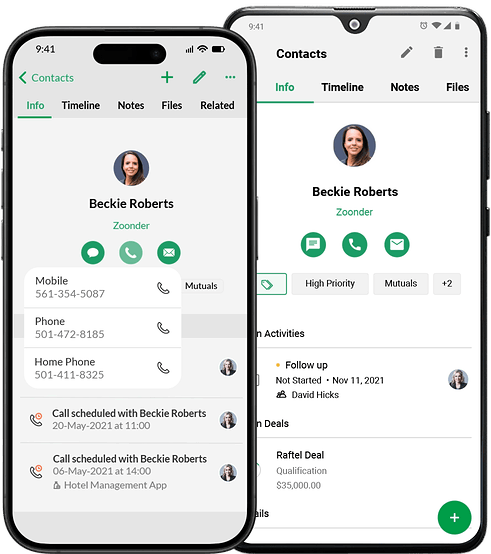

There are dozens of easy CRM software options on the market. The right one for a 250-person business looks different from the right one for a solo consultant. Here's a short checklist for picking one:
Sign up for the free trial. If you can add a contact, create a deal, and log a follow-up in under 10 minutes without watching a tutorial, that's a green flag.
Most small business plans sit between $7 and $25 per user per month. Watch for hidden costs: record storage limits, integration add-ons, and support gated behind higher tiers.
You should get pipeline management, contact management, activity tracking, email sync, reports, mobile app. Skip CRMs that lock these behind premium plans.
A small business CRM should be live in hours, not weeks. Look for spreadsheet import, guided setup, and a real onboarding session if you're on a paid plan.
Start small, but check the upgrade path. A CRM that walls off automation at the next tier becomes expensive fast.
Free trial users should get the same response time as paid users. Email a support question before you sign up and see how long the reply takes.
On onboarding specifically: Traditional CRMs treat setup as a project. Remember, a CRM built for small businesses should be easy to adopt and start using right away. Import a spreadsheet, define one pipeline, invite the team, and you're using the product the same afternoon.
The market for simple CRM software is crowded. Less Annoying CRM, OnePageCRM, Pipedrive, and HubSpot all target small businesses, but they differ on free access, automation, support, migration help, and how far the product scales.
The table below compares Bigin against those options on the features and trade-offs that matter most to a small business team.
| CRM | Bigin (Express) | Less Annoying CRM | OnePageCRM (Pro) | Pipedrive (Lite) | HubSpot Starter Customer Platform |
|---|---|---|---|---|---|
| Entry price (annual) | $7/user/mo | $15/user/mo | $9.95/user/mo | $14/user/mo | $15/seat/mo |
| Free plan | Yes - 1 user, 500 records | No - 30-day trial only | No - 21-day trial only | No - 14-day trial only | Yes - 2 users, 1,000 contacts |
| Free trial (credit card) | 15 days / No | 30 days / No | 21 days / No | 14 days / No | 14 days / No |
| Native iOS + Android app | Yes (+ iPadOS, macOS) | Yes (new in 2025-26) | Yes | Yes | Yes |
| Native WhatsApp | Yes - built in | No | No | No | No |
| Native built-in telephony | Yes - built in | No | Yes - Speed Dialer | No | No |
| Workflow automations (entry tier) | 10 workflows | None | 15 Autoflows | None - requires Growth ($39) | Limited - requires Pro |
| AI features (entry tier) | Zia AI included | None | Limited | AI Sales Assistant only | Breeze AI included |
| Onboarding fee | $0 | $0 | $0 | $0 self-serve | $0 Starter; $1,500 Pro; $3,500 Enterprise |
| Migration help on entry tier | Yes - free | Yes - free (CRM Coach) | Yes - free | Self-serve only | Self-serve only |
| Phone support on entry tier | Yes | Yes | Yes | No (Premium+) | No (Pro+) |
| Integrations | 100+ telephony + Zoho ecosystem + 2,000+ via Zapier | Mailchimp, Google Calendar + Zapier | 30+ native + Zapier | 500+ marketplace | 1,600+ marketplace |
| Hidden / add-on costs | Minimal - optional add-ons | None | None | LeadBooster $32.50, Web Visitors $49+, Smart Docs $32.50 | Marketing contact overages, Sales Seats $100+, HubSpot Credits |
| Upgrade ceiling | Bigin 360 -> Zoho CRM Enterprise (clean port) | None - flat $15/user | Max $29.95 - no enterprise tier | Ultimate $79 | Enterprise Customer Platform $4,300/mo |
| G2 / Capterra rating | 4.6/5 G2 (759) | 4.8/5 Capterra (649+) | 4.7/5 G2 (249) | 4.3/5 G2 (2,968) | 4.4/5 G2 (~13,000) |
| Entry price (annual) | $7/user/mo |
| Free plan | Yes - 1 user, 500 records |
| Free trial (credit card) | 15 days / No |
| Native iOS + Android app | Yes (+ iPadOS, macOS) |
| Native WhatsApp | Yes - built in |
| Native built-in telephony | Yes - built in |
| Workflow automations (entry tier) | 10 workflows |
| AI features (entry tier) | Zia AI included |
| Onboarding fee | $0 |
| Migration help on entry tier | Yes - free |
| Phone support on entry tier | Yes |
| Integrations | 100+ telephony + Zoho ecosystem + 2,000+ via Zapier |
| Hidden / add-on costs | Minimal - optional add-ons |
| Upgrade ceiling | Bigin 360 -> Zoho CRM Enterprise (clean port) |
| G2 / Capterra rating | 4.6/5 G2 (759) |
Four teams, four industries, three continents: same simple CRM.
events and hospitality, UK
A community swimming center with 19 partner businesses across fitness, food, and beverage. Excel and a separate booking tool kept falling out of sync. They moved to Bigin, set up four pipelines, and automated the inquiry-to-booking flow with Zapier.
Now we've got pipeline records that show why an opportunity didn't convert.
Sam Cavendish, Digital Marketing Executive
retail, Madurai, India
Second-generation family jewelery business, 40-person team, 140,000 Instagram followers. Excel couldn't keep up with leads from social. CEO Arun connected Instagram forms, WhatsApp, and outbound calling through Bigin.
Since we started capturing every deal in Bigin, our business has doubled and our team's productivity has tripled.
Arun, CEO
digital design agency, South Africa
A nine-person agency running on Google Sheets and Monday.com. Managing Director Dawid Roux moved the team to Bigin and set up connected pipelines for sales, design, and support in one system.
Bigin is game-changing. V4 Creative cannot work without Bigin.
Dawid Roux, Managing Director
women's healthcare, India
A women's PCOS program that started without a real lead-tracking system. After comparing Freshsales and LeadSquared, the team chose Bigin and built separate B2B and B2C team pipelines, with dashboards to surface untouched leads.
Bigin has stayed true to its value proposition-a CRM tailored for small business and startups.
Dev Ramnathan Sivarajah, CEO
Most small business work happens on the move. Bigin's simple mobile app runs the same product as the web version. You get:
A full pipeline on the home screen, with drag-to-update stages
One-tap call logging that captures call duration and notes
A business card scanner that creates a contact in seconds
On-device email sync with Gmail and Outlook
Voice notes attached to any deal or contact
Apple Watch shortcuts for marking tasks done from your wrist
An offline mode that syncs the moment you reconnect
Push notifications for hot deals, overdue tasks, and new leads
A simple CRM is a lightweight customer management tool for small businesses. It tracks contacts, deals, and follow-ups without the field overload or setup time of enterprise systems.
Yes. Bigin offers a free plan for a single user with one pipeline, 500 records, and three automations. It's free forever, no credit card required.
Regular CRMs are built for sales operations teams, with custom modules, deep reporting, and feature sets that take weeks to configure. A small business CRM focuses on contacts, pipelines, and activities, and skips the rest.
A small business CRM should be live within a day. Bigin's guided setup takes about 30 minutes, including spreadsheet import and pipeline configuration.
No. If your team uses Gmail or Excel, the same people can use Bigin. The interface is built for non-technical owners and operators.
Yes. Upload a CSV or Excel file, map the columns to Bigin fields, and the import runs in minutes. The Bigin team also assists with the migration on paid plans.
Yes. Bigin's paid tiers scale to 15 pipelines, 1 million records, and 100 automations. When a business genuinely outgrows it, the data ports cleanly into Zoho CRM with no rebuild.
The best fit depends on team size, deal volume, and budget. For teams of 1 to 20 with pipelines under a few hundred deals a month, look for free entry-level plans, sub-30-minute onboarding, and a real mobile app. Bigin, OnePageCRM, and Less Annoying CRM all fit this profile.
Yes. Bigin runs on Zoho's infrastructure, with SOC 2, ISO 27001, GDPR, and HIPAA compliance. Data is encrypted at rest and in transit.