- Harrini Kannan
- Published: 11/11/2025
- Last Updated: 10/27/2026
Why customer relationship management matters
Customer relationship management, in practice, is a short list of repeated actions. Someone records an inquiry. Someone decides the next step and puts a date on it. The emails and calls that follow stay attached to the customer, so a colleague can read them. When the work changes hands, the record moves with it. Every so often, a manager looks at all the records to see what is stuck.
The six businesses below each show one of those actions. Sri Anu Jewelers captures retail inquiries. AZ Real Estate assigns follow-up tasks. ACF Events keeps customer emails on the record. Runtime HRMS hands sales over to support. Jahnke Consulting keeps case notes ready for the next call. Eden Ridge Limited uses pipeline reports to decide where to help.
"CRM examples" can mean two things. Some readers want examples of the systems used to manage customer relationships, such as a spreadsheet, a small-business CRM, or an enterprise platform. Others want examples of what a business does inside one. I cover both, and most of the article goes to the second meaning.
One disclosure first. All six examples come from Bigin's published customer stories, so every business here uses Bigin by Zoho CRM, and the results are customer-reported. I have kept figures and quotations exactly as published and left out anything described as a future plan.
These six businesses show what day-to-day CRM work looks like.
Business | Industry and location | CRM use pattern | Documented action |
|---|---|---|---|
Sri Anu Jewellers | Jewellery retail, Madurai, India | Lead capture and segmentation | Forms shared through Instagram feed a pipeline with custom fields and tags. |
AZ Real Estate | Real estate, London, UK | Pipeline stages and task automation | A new lead triggers tasks for the deal owner, and hold stages keep paused clients visible. |
ACF Events | Corporate events, Bristol, UK | Shared email history | Emails sent to a customer are logged under that customer's record via Microsoft 365. |
Runtime HRMS | HR software, Pune, India | Sales-to-support handoff | A record reaching the final sales stage creates a record in the first support stage. |
Jahnke Consulting | Insurance claims advocacy, California, US | Service records and notes | Contacts, Companies, two pipelines, and tagged notes keep case information ready for calls. |
Eden Ridge Limited | Real estate, Kenya | Pipeline reporting | Dashboards show calls, call duration, deal status, and st |
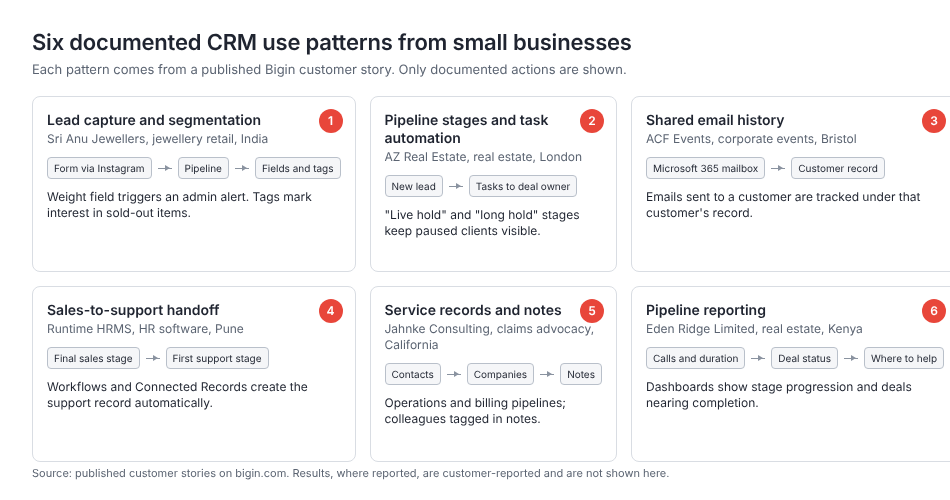
Each pattern maps to one customer example, and the actions shown are the ones the published stories describe
Spreadsheets, small-business CRMs, and enterprise platforms support different ways of working.
A spreadsheet can run a basic customer-tracking process. One row per customer, a column for the last contact, and a column for the next action is a real system. Shared spreadsheets also do more than people assume: several people can edit at once, formulas can flag overdue rows, and scripts can send reminders. The limit is structure. A spreadsheet has no built-in idea of a contact who belongs to a company and has three open deals, so that relationship is rebuilt by hand in every tab. Communication history stays in inboxes, and every report is built by hand. A spreadsheet can hold customer data, and it is not a dedicated CRM application.
A small-business CRM gives records a fixed shape, with contacts linked to companies and deals, and an owner on each record. Emails sync to the record, tasks attach to the deal, automation runs when a stage changes, and reports come built in. An office manager can usually administer it. The trade-off is a narrower feature set.
An enterprise platform adds deep customization, layered permissions, processes that cross departments, and reporting that spans business units. It also needs an administrator, and often a consultant.
The two CRM categories overlap. One vendor can sell editions for different sizes, which is why Zoho offers both Bigin and Zoho CRM, and Salesforce and HubSpot both sell editions aimed at smaller teams. Enterprise software is not automatically wrong for a small company with complex processes, and a simpler CRM is not automatically enough for a small team with heavy compliance or integration needs.
Sri Anu Jewellers captures retail inquiries and records what customers want.
Sri Anu Jewellers is a jewellery retailer in Madurai, India, with a 40-member team and a physical store. Its published story describes walk-in customers tracked in Excel, which worked until online marketing and social media outgrew the sheet. CEO Arun wanted one place for online and offline leads.
The team built forms with Bigin's form builder, shared them via the company's Instagram bio, and submissions go straight into the sales pipeline. The story describes a shared form; it does not say every Instagram message flows into the CRM.
After capture, leads are segmented by the metal the customer asked about, gold or silver. Sales staff record the jewellery weight in a custom field, and the story says that "whenever the weight crosses a certain limit, an automation triggers an alert" telling the admin to prioritize the lead. The threshold is not published. When a product sells out, but a customer shows interest, the team assigns a tag so they can filter and contact them once stock returns.
Arun's reported result: "Since we started capturing every part of our inquiries in Bigin in 2024, our business has doubled, and our team's productivity has tripled compared to previous years." That is customer-reported, with no published baseline. The lesson is narrower: capture the inquiry in a structured form and record the detail that decides priority.
AZ Real Estate assigns follow-up tasks and keeps paused opportunities visible.
AZ Real Estate is a boutique agency in London, founded in 2012 by Alisa Zotimova, that sells and sources homes in prime central London. Its published story says the team ran on Trello and spreadsheets until 2021, when a consultant recommended Bigin for its ready-made real estate template.
The sales pipeline carries stages for pitching, site visits, contract signatures, memo signatures, completed deals, and closed lost deals. It also has two pause stages, "live hold" and "long hold," for clients who are not ready yet but might be later. A hold stage keeps the opportunity visible without pretending it is moving.
The automation assigns tasks rather than sending messages. As soon as a lead enters the pipeline, the deal owner is automatically assigned a series of consecutive tasks, so a new lead cannot sit untouched. The story does not publish the task list, the intervals, or the deadlines, and it does not say the system emails the client.
Newsletters run through a documented Mailchimp integration, which sorts Bigin contacts into Mailchimp audiences segmented by language and contact type. The story describes a WhatsApp rollout as a future plan. The workflow stands on its own: define what a new lead triggers, and give the maybes a place to wait.
ACF Events keeps customer emails connected to the work.
ACF Events is a corporate event provider in Bristol, UK. Its published story describes a spreadsheet failure. Every inquiry went into a sheet, but each person handled client details and follow-ups their own way, which the story says "made it difficult for team members to step in for one another during absences."
ACF connected its email account to Bigin through the Microsoft 365 integration, using IMAP, and the story states that "every email sent to the customer from their account is tracked in Bigin under the customer's record." When a colleague is out, the correspondence is waiting on the customer's record.
Email integration syncs the mailbox you already use, so messages appear on the matching record. Bigin also has a separate feature called Email-In, which gives a pipeline its own address and turns incoming emails into new records. The ACF story documents the integration and does not mention Email-In.
Head of Marketing Lyndsay Pruen put the result in one sentence: "With Bigin, each member of the team can now see what stage each event is at." The story's growth figures are phrased differently in its headline and body, so I have left them out.
Runtime HRMS creates a support record when a sale reaches its final stage.
Runtime HRMS, founded in 2016 and based in Pune, India, builds HR and payroll software with a team of about 30. Its published story centers on a handoff. The company runs two pipelines, one for sales and one for support. When a sales record reaches its final stage, workflows and Bigin's Connected Records feature create a new record in the first stage of the support pipeline, without a manual step. The story says this reduced errors and miscommunication between the teams.
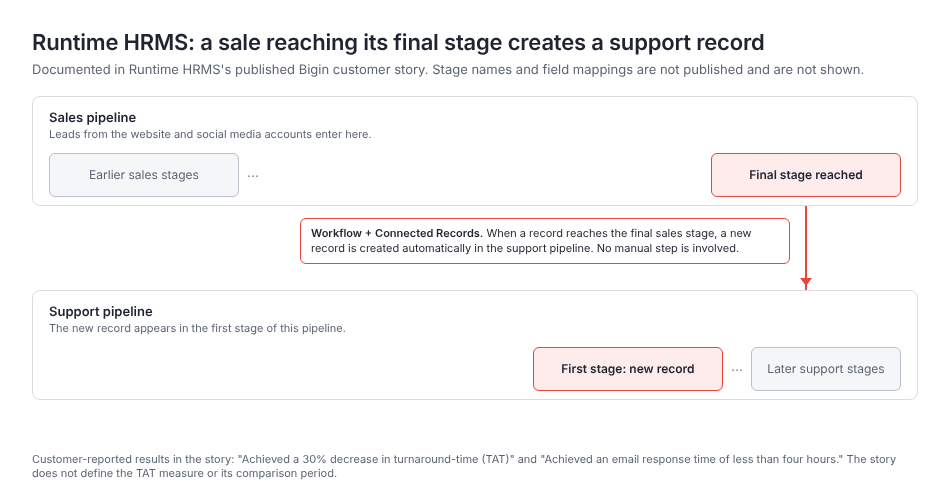
The documented trigger is a record reaching the final sales stage, and the documented result is a new record in the first support stage.
The page does not say which fields carry over, who receives the new record, or what support obligations start when it appears, so this article does not either.
The story reports two results, quoted as written: "Achieved a 30% decrease in turnaround time (TAT)" and "Achieved an email response time of less than four hours." The page does not define how turnaround time was measured or what period it was compared against, so I read the 30% as the customer's own measure and not as resolution time or a service-level commitment.
A support pipeline is a sequence of stages, and it does not give you everything a dedicated help desk does. The lesson is that closing a sale should create the next team's record automatically, because that is the moment handoffs usually fail.
Jahnke Consulting keeps case information available for the next conversation.
Jahnke Consulting Inc. is a California firm founded by Linda Jahnke. It is a claims advocacy practice that helps families file insurance claims and deal with insurers. Its published story describes hundreds of active clients and constant calls from insurance providers, each needing case notes, claim updates, and recent services at once.
This is what day-to-day service work in a CRM looks like. Clients live in Contacts, and the insurance providers live in the Companies module. Daily work runs through two dedicated pipelines, one for operations and one for billing. Support agents manage tasks and follow-ups in Activities. Every conversation with a client or an insurer is recorded in notes, where team members tag colleagues.
When an insurer calls, the person who answers opens the client's record and sees the notes, the claim updates, and the latest services in one place, whoever wrote them. Operations & Billing Manager Lori Piedra described the scope: "The CRM is our database. About 95% of the information we have on clients lives in Bigin." That is a statement about where information is stored, not a productivity figure or an accuracy score.
Custom Views let each case manager see only the clients and cases assigned to them. That is filtering, which is different from restricting access, and a saved view is not a permissions setting.
The firm describes customized automations as its next step, so the documented workflow is still largely manual. Structured records and consistent notes are useful before any automation is in place.
Eden Ridge Limited uses pipeline reports to identify where its team needs help.
Eden Ridge Limited is a Kenyan real estate company founded in November 2016 by Jack Wafula, its CEO. Its published story describes spreadsheets that passed from person to person as staff changed, with inconsistent data and opportunities lost to badly timed follow-ups.
The Pipelines module shows how long a lead takes to move from one stage to the next and lets Wafula identify deals reaching completion within a specific month. Dashboards show how many calls the team makes, how long those calls last, overall progress on deals, and the status of each deal.
The story says the dashboards help him pinpoint where the team may need assistance, whether in lead generation or in refining their sales approach. A dashboard shows that something changed. It does not prove why. Short calls might mean efficient agents or rushed ones, and the manager still has to go and find out.
The story reports that "timely follow-ups facilitated via the CRM have resulted in a remarkable 20% increase in sales." The figure is customer-reported, with no published timeframe or baseline, and I would not expect it to transfer to another business. The habit transfers even if the figure does not.
Choose the workflow that matches a problem your team already has.
No business in this article started with all six workflows. Pick the one that matches a problem you already have.
If inquiries arrive from several channels and get lost, the Sri Anu Jewellers pattern applies. You need a form per channel, a field that decides priority, and a pipeline owner. It works when you list last week's inquiries with their next actions.
If leads go quiet because nobody owns the next step, the AZ Real Estate pattern applies. Decide what a new lead should trigger, then count the open deals with no task attached.
If colleagues cannot cover for each other, the ACF Events pattern applies. Connect the mailboxes, and check whether someone can answer a customer while the usual contact is on leave.
If sales closes deals and support finds out late, the Runtime HRMS pattern applies. Define the trigger stage and the fields that carry over, then count the closed deals that reach support without a hallway conversation.
If staff need case history during live calls, the Jahnke Consulting pattern applies. Standardize where notes go, and test whether a new hire can handle a call from the record alone.
If you cannot see where the team needs help, the Eden Ridge pattern applies. Review stage durations and activity counts on a fixed schedule, then go and ask.
In each case, copy the general lesson and not the specific implementation, because your stages, fields, and integrations should come from your own process. Our guide to using a CRM for day-to-day work covers the setup habits, and our article on sales CRM software for small business covers choosing the tool.
To try these workflows in the product the six businesses use, Bigin by Zoho CRM has a free edition for one user with a single pipeline and three automations. Team pipelines, which the Runtime HRMS and Jahnke Consulting examples depend on, start with the Express edition, and Connected Records also need a paid edition. I checked the pricing page on October 27, 2026. Start with the one workflow that matches your problem, and try Bigin free with your own records.