- Features
- WhatsApp integration
WhatsApp + Bigin:
The dream team for seamless communication
WhatsApp is one of the easiest ways for customers to reach you, whether they'’re placing orders, asking questions, or sharing concerns. By enabling Bigin's WhatsApp integration, you can respond to messages promptly, maintain chat history linked to a contact, and process your customers' requirements expeditiously—all while leveraging Bigin's boundless capabilities.
Sign Up For FreeHere's how we can help you
- Engage in WhatsApp conversations without leaving Bigin.
- Link your complete chat history to contact records.
- Add and update WhatsApp contacts in Bigin.
- Send WhatsApp messages automatically.
- Initiate conversations with customizable templates.
- Locate chats instantly.
- Smart, AI-powered reply suggestions
- Summarize entire WhatsApp chats in one click
Communicate via WhatsApp without leaving Bigin
Let's say your customer has reached out via WhatsApp, inquiring about the status of an order they placed. You switch to a spreadsheet or a CRM, go through your entire contact list, locate the required information, switch back to WhatsApp, and then find that customer's chat so you can share the requested information. Sounds like a total productivity killer right? Well, it is! Bigin's integration with WhatsApp is just what you need to weed out these unnecessary steps.
This integration brings the convenience and familiarity of WhatsApp messaging to your CRM and strengthens its functionality. Engage in and manage conversations with your clients via WhatsApp while enjoying access to all the information you need in the same window.

WhatApp integration,
enhanced by AI
Smart reply suggestions
On the go and responding to a WhatsApp chat? Gemini Nano's on-device assistance generates smart, contextual replies that keep the conversation flowing.
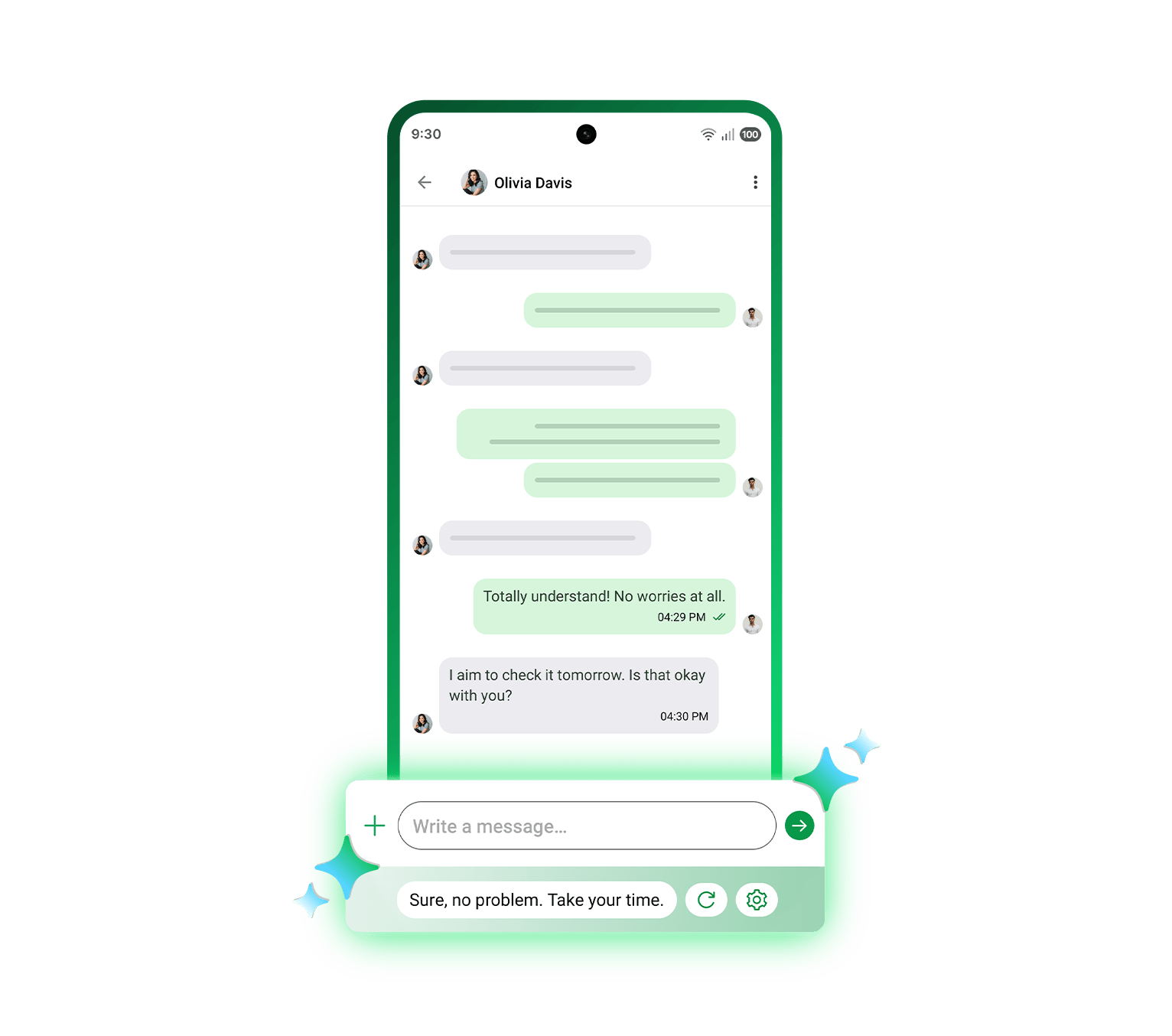
Disclaimer: Available on mobile devices that support Gemini Nano.
Chat Summary
Need to understand what’s going on with a customer chat? Zia can generate clear, easy-to-read summaries of your WhatsApp messages helping you quickly understand the context.

Foster team collaboration with a
shared inbox
By integrating WhatsApp with Bigin, every member on your team will be able to pitch in by viewing,
responding to, and engaging in chats.
Furthermore, Bigin automatically assigns each incoming chat to a member of your team to ensure every chat is attended to promptly. If a team member is unavailable, the chat can be quickly reassigned.

Convert conversations into happy customers
Received a new order via WhatsApp? A customer has an issue with your product? A prospect requested a demo? The Add Pipeline Record option enables you to create a new record in the relevant pipeline based on the message you've received.

Manage chats, clients, and everything
in between
View and edit information related to a contact, track the records associated with them in various pipelines, send emails, and perform other quick actions using the right-hand panel. You can also create and associate notes with each message for future reference.

Use templates to initiate fruitful conversations with your customers
From sending welcome messages and payment reminders to sharing order status updates, you can do it all with WhatsApp templates. Create and share highly customizable, interactive, and personalized messages to engage with customers proactively.

Automate WhatsApp communication
Stay connected with your customers without doing anything! Whether it’s sending a delivery update, a thank-you message right after purchase, or a cross-sell message a few weeks later, Bigin handles it for you. Just specify which message to send and when, and it will automatically reach your lead or customer at the right moment.

Quick replies for shorter response times
Use the Quick Replies feature to curate responses to frequently asked questions, common requests, and other recurring messages your customers send. Relying on a ready-made response doesn't mean you have to lose your personal touch.

Identify the required message in seconds
Based on your assignment rules, messages are sorted between the My Chats and All Chats views,
making it easier for users to access the messages for which they're responsible.
Additionally, you can filter out messages based on specific criteria, like the date of the conversation,
assigned user, and status.

Go beyond just talking to customers on your mobile
What's a WhatsApp integration without mobile support? Bigin's iOS and Android apps are perfect for engaging in WhatsApp chats, quickly performing actions related to those chats, and making your customer happy on the go.

Maintain data security and provide your customers with the best assistance
Bigin offers two levels of user permissions: view and view and reply. Give the appropriate level of access to users in each profile, thus ensuring that only qualified and responsible individuals interact with your prospects and customers.

Still have more doubts?
Here are the answers to some frequently asked questions!
on the web version.
Yes, there is a specific time window for replying to WhatsApp messages when you use the WhatsApp integration in Bigin. If a customer initiates the conversation (they message you first), your business can reply with any type of message (text, image, video, attachments) for 24 hours from the time of the customer’s message, without extra conversation charges. If you want to reach out after that 24-hour window has expired, you must send a pre-approved WhatsApp template message to re-open the conversation; once the customer replies to that template, a new 24‑hour session starts and you can again send any free-form messages within that window. Similarly, when your business initiates the conversation, the first message must be a WhatsApp-approved template, and if the customer replies, you get a 24‑hour free-form messaging window. You can manage and use these templates in Bigin under Setup > Messages > Templates, and they are required whenever you need to restart an inactive conversation session. You can read the full details in this article.
Bulk WhatsApp sends often rely on an add-on or extension rather than the basic setup. Bigin has a marketplace where you can check for options that fit your needs.
Trusted by 30,000+ small businesses globally
I have been looking for a CRM that was easy-to-learn and use for my sales teams who were totally dependent on spreadsheets. With the Bigin, I am able to see the complete view of my sales. Unlike Excel, I can set up customized dashboards to see various types of data including: daily, weekly, and monthly sales, total open leads that need my attention, etc. I am delighted with the product and super happy with the awesome support team.
We decided to transform ourselves for the post COVID era and our data was scattered over multiple excel files among so many people. We decided to invest in a CRM that would be easy for our team to use. Bigin suited our requirements as it was easy to use, cost effective and provided us with simple dashboards. We are happy to start our journey with Bigin which is helping us consolidate and clean our database. I am sure once we are through with our initial activity of data capturing and cleaning, Bigin will give us a boost in our marketing and sales efforts.
It's absolutely awesome to use Bigin. We are now able to manage our business and customer conversations in a smarter way, for which we were looking for a CRM system previously. Real-time history of a conversation with multiple searching options makes it comfortable, even for entry-level incumbents. At a glance, the dashboard view is an excellent one for any decision-maker. Thanks for a great product and the support we have had from the Bigin team
Receive, respond to,
and record WhatsApp messages without leaving Bigin
Sign Up For FreeSee Our Pricing15-day free trial. No credit card required. No hidden charges.